

Content Harmony is built around a practical SEO content workflow: research what’s ranking, turn that research into a writer-friendly brief, then grade a draft to make sure it actually covers the topics and phrases the SERP expects.

Instead of treating optimization as a last-minute checklist, it’s designed to connect briefing and drafting so fewer important sections get missed. That makes it especially useful for content teams that want a repeatable content creation process, not just another one-off Content Editor.
This review focuses only on content-related features: keyword and SERP research inputs, briefing, grading, and how the workflow fits into real content production for blog posts, landing pages, and other page SEO assets.
Quick summary
Content Harmony’s core unit is a Content Workflow, which bundles a Keyword Report, a Content Brief, and a Content Grader into one repeatable loop
Where it’s especially helpful
- Building briefs faster without losing key SERP analysis insights like intent, questions, and authoritative references
- Getting content writers aligned on structure before they draft, using competitor outline patterns as guardrails
- Running a quick content scoring pass so drafts reflect the brief, without obsessing over keyword density
- Supporting content strategists and content managers who need consistency across multiple projects or clients
Where it can fall short
- If your team wants a single, always-open writing editor experience first and briefing second, Content Harmony can feel more strategist-led
- It can encourage SERP mirroring if you don’t actively add differentiation like POV, SME insight, original examples, or stronger E-E-A-T signals
- Teams looking for deeper keyword data or rank tracking may still need to pair it with other SEO tools like Ahrefs, Semrush, or Google Search Console
What Content Harmony is
At a high level, Content Harmony is a content planning and optimization platform that helps you:
- Analyze search intent, SERP structure, and freshness signals from search engines
- Identify recurring topics, related keywords, and competitor structure patterns
- Build detailed content briefs with questions, sources, and visual requirements
- Grade a draft using a topic modeling approach that emphasizes broader phrase coverage instead of density tricks
It’s less of a full keyword research tool and more of a workflow layer for turning SERP analysis into better content. In other words, it helps you move from topic research to execution with less chaos.
Who it’s best for
Best for
- SEO teams where a strategist builds briefs and writers execute them
- Agencies that need consistent briefs across many clients
- Content ops teams that want the same “research → brief → grade” steps every time
- Teams managing freelance writers who need detailed briefs and clear handoffs
Who may need more
- Teams looking for a deep keyword database or broader keyword research tools in the same platform
- Orgs that want advanced content operations features like granular user permissions, seat management, or heavier workflow automation
- Teams that need built-in content calendars, CMS publishing, or wider marketing tools beyond page optimization
Feature Breakdown
1. Keyword Reports and SERP research inputs
This is where Content Harmony earns its keep. Each Keyword Report is structured into specific sections, which makes it easier to turn SERP research into decisions, not a pile of tabs.

The report includes:
- Search Intent
- Topic Analysis
- Competitor Outlines
- Questions
- Authoritative Sources
- Competitor Analysis
- Image/Visual Analysis
- Videos
How to use it (quick SOP)
- Start with intent and SERP format. Decide what kind of page you’re building and what good looks like in the search results.
- Pull only the subtopics that are truly required to satisfy intent and support the target keyword.
- Choose a handful of questions that deserve real answers, then map them to sections.
- Build the brief before drafting so the writing process starts with alignment.
That sequence helps prevent one of the biggest SEO copywriting problems, which is drafting too early and fixing structure later.
2. Search intent analysis (so you don’t draft the wrong page)

Content Harmony calls out intent modifiers and SERP expectations like:
- What formats Google is showing
- What types of pages are ranking
- How much freshness matters
- Trend signals for the query
This is one of the best places to prevent wasted drafts. If the SERP wants a template, a list, or a definition-heavy explainer, you’ll catch that before writing.
For content teams, this is a major win because misreading intent creates avoidable rewrites, lower content quality, and weaker ROI. It also improves your odds of earning organic traffic by matching what users actually expect when they type a search query.
3. Topic analysis and the topic model
Topic Analysis is geared toward understanding common phrases used across competitors so your page aligns with how the SERP is currently written and interpreted.
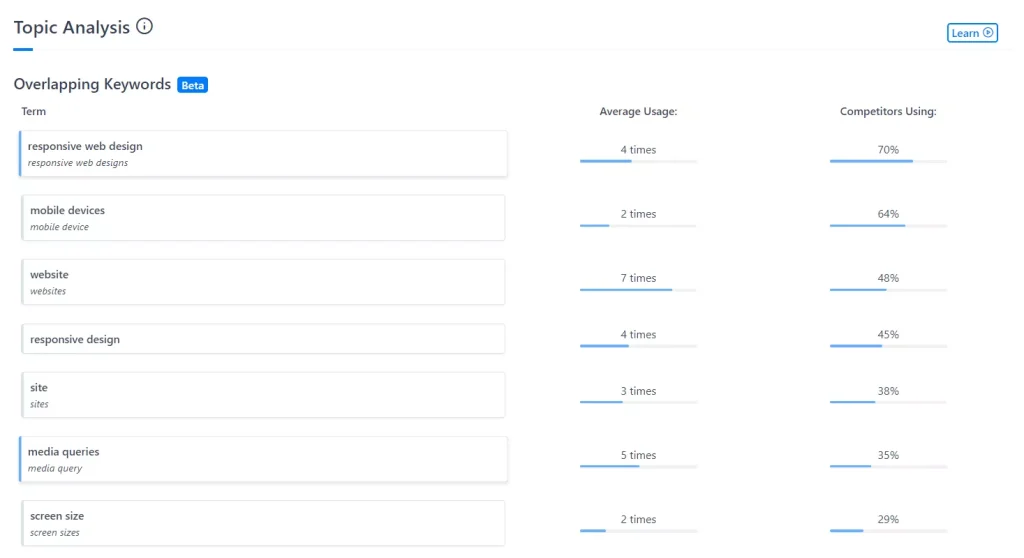
Used well, it’s a coverage compass. Used poorly, it becomes a make-it-sound-like-everyone-else machine.
The difference is whether you treat it as a minimum bar, then add unique proof, experience, and examples. That’s especially important now that AI Content and AI writing tools can produce generic drafts fast. Content Harmony can help with topical coverage, but it still needs human judgment to produce better content.
This is also where the tool supports topical authority work. You’re not just adding phrases for an SEO score. You’re making sure the draft actually addresses the core concepts search engines and users expect to see.
4. Competitor outline and heading analysis
Content Harmony’s outline analysis is meant to help you scan how top-ranking pages are structured and borrow the best patterns while building a better outline.
This is useful for heading extraction and content outline development because it reduces guesswork. You can quickly spot recurring section order, missing subtopics, and common framing across competitor content.
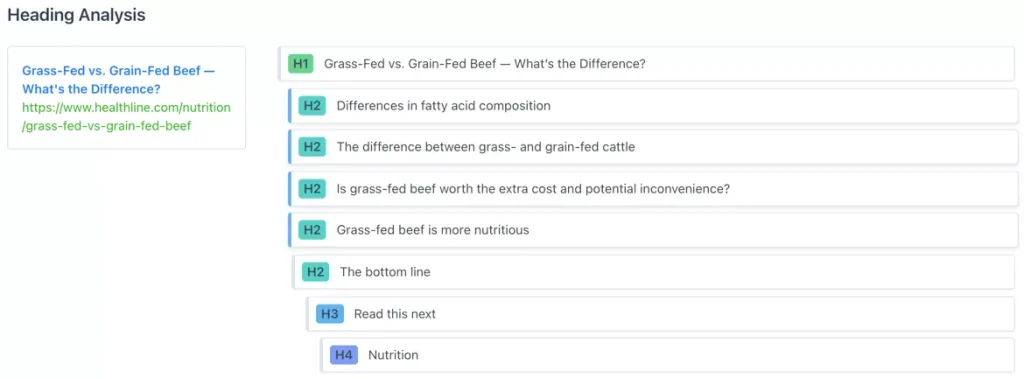
Best practice
- Use competitor headings to validate section order and completeness
- Then rewrite headings in your own language and add sections competitors can’t write, like case studies, internal data, screenshots, expert commentary, or process steps
That’s how you avoid thin competitive analysis and create high-quality content instead of a remix of existing search results.
5. Questions analysis (PAA and beyond)
Questions are a direct input into your structure and FAQs. Content Harmony emphasizes finding People Also Ask opportunities and other relevant questions so your page answers what users and the SERP care about.
This is helpful for both content ideation and page optimization because it gives you a practical bridge between research and execution.

Tip: Don’t dump every question into an FAQ. Pick the ones that reinforce your main narrative and intent, and answer the rest naturally inside the relevant sections.
That usually leads to better content quality and a stronger user experience than bolting on a giant FAQ at the bottom.
6. Authoritative sources and visual requirements
A big differentiator versus many score-only tools is that Content Harmony bakes in research inputs like authoritative sources, plus image/visual and video analysis inside the Keyword Report.

This is underrated because it helps you produce content that feels referenced and complete, not just optimized.
It’s especially useful for content creators and content strategists who want to build detailed content briefs that include:
- source expectations
- screenshot needs
- chart or visual requirements
- embedded media opportunities
That kind of planning improves the final asset and makes the writing process smoother for content writers and freelance writers.
7. Content Briefs: turning research into a clean handoff
Content Harmony’s brief editor lives inside the Content Workflow alongside the report and grader.

This is one of the strongest parts of the platform. It encourages content briefing as a first-class step, not a side note in Google Docs or Slack.
Brief checklist (what to include)
- Working title + 1 sentence intent statement
- Section plan with what this section must accomplish
- Priority questions mapped to headings
- Required citations or reference sources
- Notes on examples, proof points, tone, and constraints
- Visual requirements and optional internal links
The best outcome is fewer rewrites because everyone agrees on what good looks like before drafting.
For teams that rely on brief templates, Content Harmony offers a more structured in-tool workflow. It won’t replace every custom template setup, but it can reduce handoff friction and improve team collaboration.er rewrites because everyone agrees on “what good looks like” before drafting.
8. Content Grader: optimization that avoids density chasing
The Content Grader is positioned as an AI-driven topic model that helps writers use a broader set of phrases, not “silly keyword density metrics.”

The mindset here matters. Grading is not “is this article good?” It’s “did we cover what we needed to cover for this query?”
That makes it a practical tool for on-page SEO and SEO optimization, especially when paired with a strong brief.
Import from URL (great for refresh workflows)
You can paste a published URL into the Content Grader and fetch the live page content, with options like Fetch Article or Fetch Full Page.
That makes Content Harmony useful for updating existing content, not just net-new drafts. It’s a strong workflow for content audit and refresh projects where you need to optimize existing content and improve topical coverage without rewriting from scratch.
Real-world use cases
Optimize New Content Before Publishing
- Build a report
- Convert it into a detailed brief
- Draft in your preferred editor or CMS
- Run a grading pass before publishing
This is the cleanest path for teams that want consistent page SEO outputs.
Optimize Existing Content
- Import an existing URL
- Identify missing subtopics or weak sections
- Update the draft
- Re-grade and republish
This is a strong fit for content refresh programs, especially if you’re trying to recover rankings or improve CTR on aging pages.
Agency production and collaboration
- Standardize content briefing across strategists and writers
- Create consistent deliverables across accounts
- Improve collaboration between SEO, content, and account teams
For a SaaS or SEO agency environment, this can tighten execution without forcing everyone into a new all-in-one system.
Performance notes, learning curve, and pitfalls
Learning curve: light to moderate. Most of the skill is knowing what to ignore and when to stop.
That’s true for most content tools. The platform can surface a lot of inputs, but strong SEO strategies still depend on judgment, not just checklists.
Common wins
- Faster brief creation because the report organizes the content research inputs for you
- Better consistency between what the brief asked for and what the draft delivered
- Stronger handoffs for content teams and content managers
- Easier content analysis for updates and refreshes
Pitfalls to watch
- Copying competitor headings too literally, which leads to samey content
- Score chasing, where content scoring becomes the goal instead of quality content
- Stuffing every question into a bloated FAQ instead of integrating answers into the narrative
- Treating topic coverage as a substitute for expertise, proof, and original value
Pricing
Content Harmony pricing is based on Content Workflows per month, with a paid trial option shown on their pricing page.

Common plan anchors:
- Standard 5: $50/mo (5 workflows)
- Standard 12: $99/mo (12 workflows)
- Standard 25: $199/mo (25 workflows)
- Standard 50: $299/mo (50 workflows)
- Standard 100: $599/mo (100 workflows)
- Standard 150: $799/mo (150 workflows)
- Standard 200+: Starting from $1000/mo (200 workflows)
The pricing model is straightforward if you think in terms of production volume. If your team runs a predictable number of pages per month, the workflow-based subscription is easy to plan around.
If you’re comparing Content Harmony alternatives, make sure you compare pricing packages by actual usage, not just entry-level price. Some platforms look cheaper but require more seats or add-ons.
Pros and cons
Pros
- Keyword Reports are structured around the exact inputs you need to build a real brief (intent, topics, outlines, questions, sources, visuals)
- Brief builder is designed for handoff consistency inside the same workflow
- Content Grader focuses on topic coverage and broader phrase sets vs density
- URL import supports refresh workflows
- Good fit for content strategy and content planning at the team level
Cons
- Strategist-led workflow may feel heavier if you just want to draft first and optimize inline
- Without strong editorial standards, competitor structure can make your content blend in
- Not a full replacement for keyword research, rank tracking, or broader SEO tools
- Teams that want deeper workflow automation or API access may need supplemental tools
Not sure how it stacks up against other platforms? Use this roundup of the top SEO content optimization tools to shortlist alternatives.
Where Content Harmony fits among SEO content optimizers
Content Harmony is best described as a briefing-first optimizer. It’s strongest when you want SERP research, brief creation, and grading to be one connected process, especially across teams.
If your workflow already has strong briefs and you mainly want a fast, editor-centric optimization pass, you might prefer a tool that’s built around a live writing editor experience.
A strong alternative if you want editor-first optimization
If you like the concept of topic coverage scoring but want a more editor-driven experience that shows what’s missing while you write, Rankability’s Content Optimizer is a standout alternative.
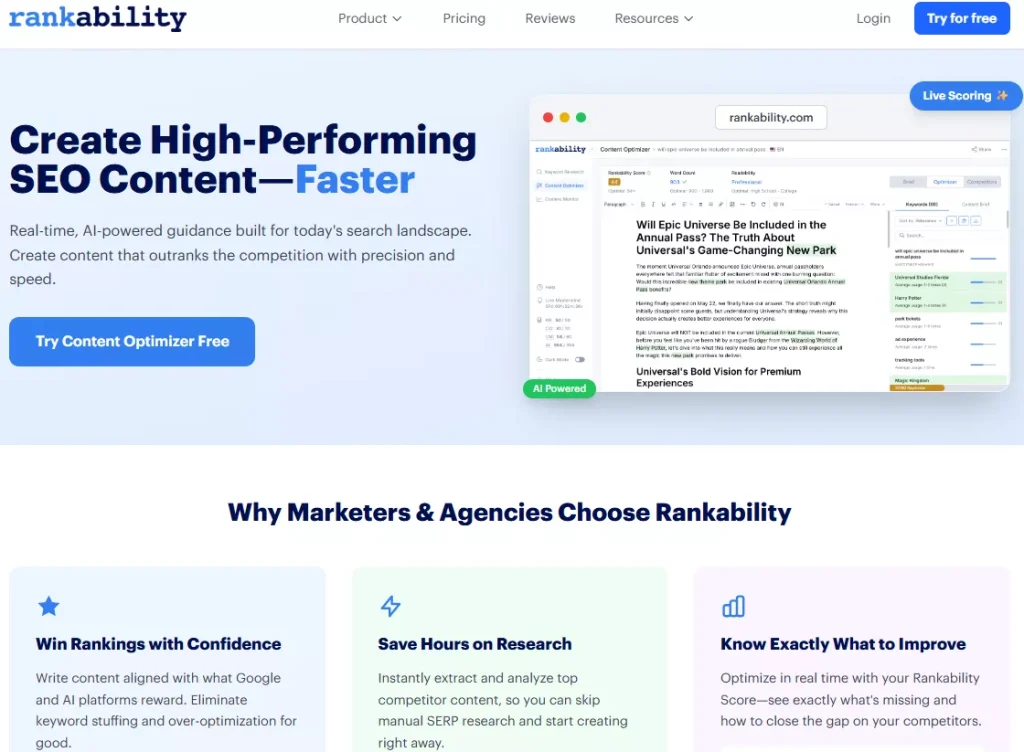
It focuses on real-time topic coverage scoring and actionable feedback designed to close gaps quickly, which can feel faster for teams that want optimization to happen inside the writing process instead of around it.
Pick Content Harmony when
- You want the cleanest “research → brief → grade” workflow and standardized deliverables
Pick Rankability when
- You want optimization to happen primarily inside the editor with live scoring and clear gap closure guidance
FAQ
Can Content Harmony grade existing content?
Yes. You can paste content into the grader, and it also supports importing live content from a published URL.
Is the grader about keyword density?
It’s positioned as topic-model driven and focused on broader phrase coverage rather than density metrics.
What’s included in a Keyword Report?
Content Harmony lists sections like Search Intent, Topic Analysis, Competitor Outlines, Questions, Authoritative Sources, plus visual and video analysis.
How does pricing work?
Plans are based on monthly Content Workflows, with tiers like 5, 12, 25, and 50 workflows.
Verdict
If your biggest bottleneck is turning SERP research into consistent, high-quality briefs that writers can execute, Content Harmony is a smart buy. Its Keyword Reports are opinionated in a good way, and the workflow makes it easier to go from “what should we write?” to “did we actually cover it?” without defaulting to keyword stuffing.
You’ll get the best results when you treat its outputs as guardrails, then layer in what competitors can’t replicate: original examples, real experience, clear POV, and proof.