

If you’re evaluating SE Ranking for content optimization, you’ll mostly be living inside its Content Editor and the surrounding Content Marketing toolkit.
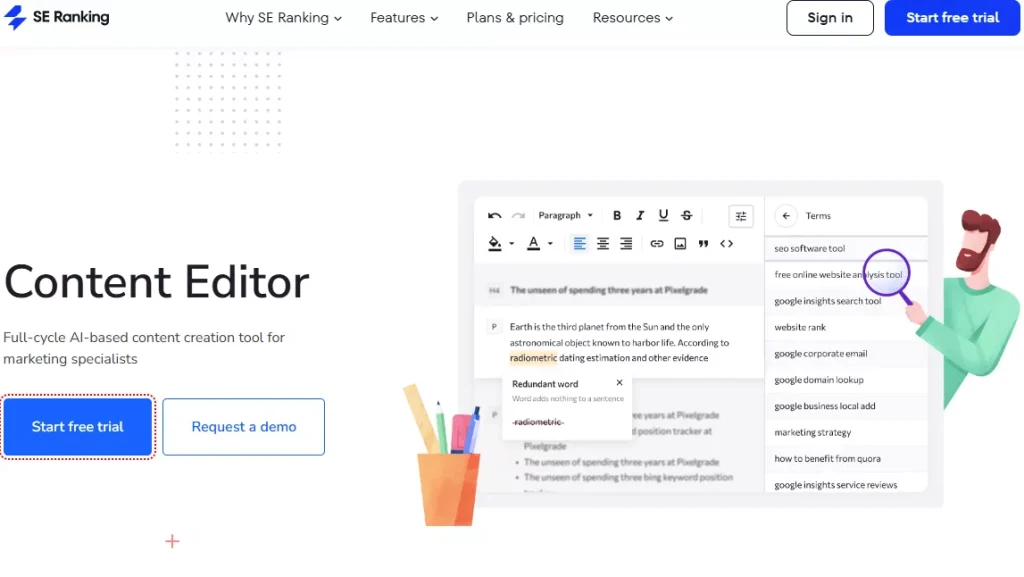
It’s built to help you turn SERP patterns into an actionable brief, write inside an editor (or Google Docs), and then improve a “Content Score” using concrete, checklist-style recommendations.
Below is a content-focused review of what it does well, where it can feel limiting, and how to decide if it fits your writing workflow.
Key takeaways
- Best for: teams that want a SERP-driven brief + content score workflow inside a broader SEO platform, especially if writers draft in Google Docs.
- Core strengths: competitive SERP-based brief requirements, keyword recommendations (including NLP-based suggestions), outline building, and in-editor optimization guidance tied to Content Score and “Brief Progress.”
- Big watch-out: it’s easy for teams to drift into “score-first writing” unless they treat the score as a guardrail, not the goal. SE Ranking itself frames recommendations as something you can accept, adapt, or ignore.
What is SE Ranking’s Content Editor?
SE Ranking’s Content Editor is a content optimization workspace that analyzes what’s ranking in the SERPs and turns that into:
- recommended content parameters (like length and structure),
- keyword and term suggestions,
- a brief and outline workflow,
- and optimization feedback while you write.
SE Ranking also offers a Google Docs integration so writers can draft in Docs while still seeing optimization guidance.
How SE Ranking approaches content optimization
Most content optimizers follow some variation of: analyze SERP leaders → create a brief → write → optimize → publish.
SE Ranking leans heavily into that “brief-first” loop:
- Create a brief from SERP analysis (word count, structure, keywords, media elements, and more)
- Write and optimize with AI support available (optional)
- Publish (WordPress integration is positioned as a direct publishing step)
- Monitor performance inside the editor using GSC metrics like impressions, clicks, CTR, and average position
If you’re trying to build a repeatable editorial system, that lifecycle framing is helpful. It nudges teams to stop treating “optimization” as a last-minute pass and start treating it as a planning discipline.
If you want to see how other platforms handle this workflow, compare the best tools for optimizing content for SEO.
Feature review: content optimization capabilities
1. SERP-driven brief creation
This is the foundation of the tool.
SE Ranking states that the Content Editor “scours through the target SERPs” to provide guidance on content requirements like word count, keywords, structure, and media elements.
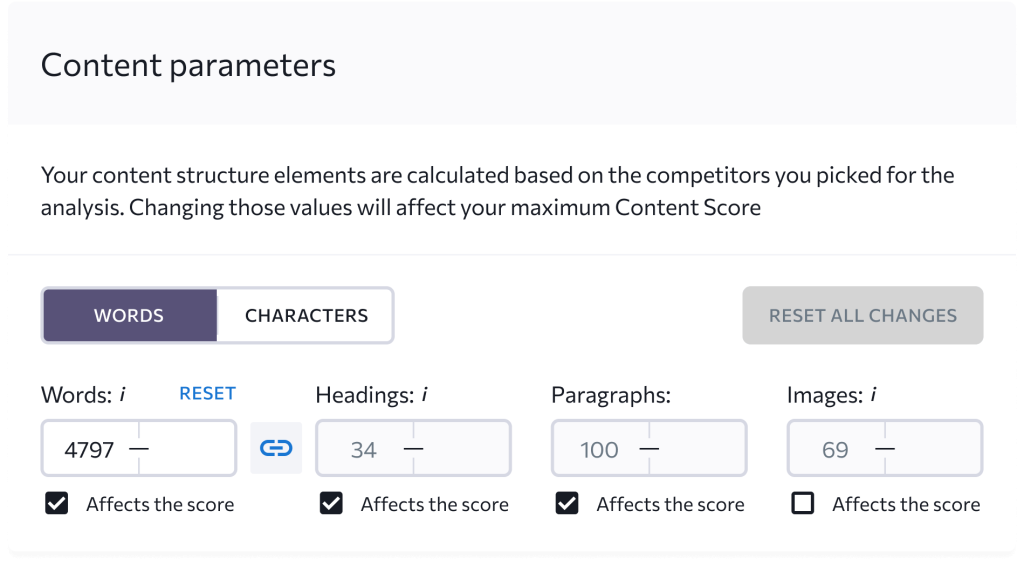
In the Content Editor workflow, you’ll see steps like:
- using competitive research to set requirements
- choosing relevant keywords (including NLP-driven terms and usage context)
- and building an outline based on competitor structures
Why it matters: briefs are where most teams win or lose. A good brief reduces rewrites, narrows “interpretation gaps” between SEO and writers, and prevents the classic problem of publishing a well-written article that misses the real intent.
How to use it well
- Start with the tool’s suggested parameters, then adjust to match your brand’s depth and voice.
- Use competitor structures as references, not templates. (Your goal is “cover the topic better,” not “copy the headings.”)
2. Keyword and term recommendations
SE Ranking positions the editor as providing “tips on word count, keywords, and text structure” based on SERP leaders.
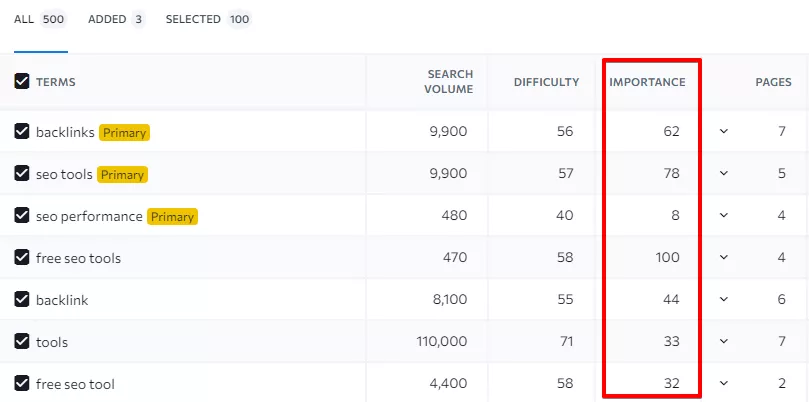
In its Google Workspace listing, SE Ranking also highlights NLP-recommended terms and expressions as part of the keyword suggestions.
Where this helps
- catching subtopics you forgot,
- mapping synonyms and related phrases,
- and preventing over-reliance on a single “exact match” phrasing.
Where teams can misuse it
- forcing every suggested term into the copy
- turning the article into a checklist instead of a clear explanation
A good rule is: if a term doesn’t improve clarity or completeness, don’t add it.
3. Outline builder based on competitor structure
SE Ranking includes a step dedicated to building a “unique outline,” using competitor heading structures to guide your own, with the ability to add comments for copywriters.
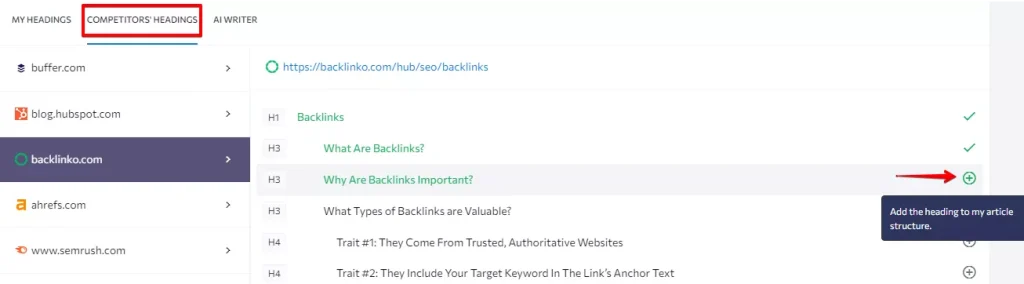
This is one of the most practical parts of the workflow because it makes the handoff easier:
- SEO can define structure and coverage expectations
- writers can focus on execution and clarity
- editors can verify the brief was actually followed
4. Content Score + Brief Progress
Inside the editor experience, SE Ranking emphasizes an iterative optimization flow: your content score rises as you optimize directly in the editor.
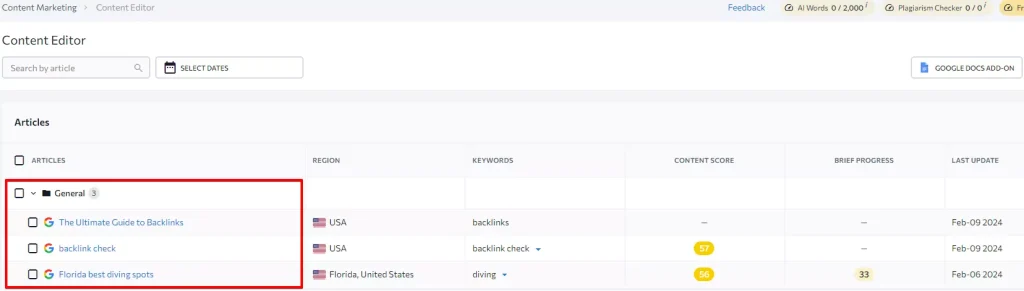
In SE Ranking’s help docs, the Improvements tab is described as doing two main things:
- evaluating Content Score and showing Brief Progress
- providing actionable suggestions to improve both
What’s good about this approach
- It’s concrete. Writers aren’t left guessing what “optimized” means.
- It nudges completion. Brief Progress acts like a finish line.
The potential downside
- Teams can overfit to the score. That’s a management problem, not a tool problem, but it’s real.
A simple fix: treat Content Score as a QA check, then use human editing to win on clarity, examples, and originality.
5. Readability, grammar, and plagiarism checks
SE Ranking highlights built-in checks for plagiarism, readability, and grammar errors as part of the Content Editor toolkit.
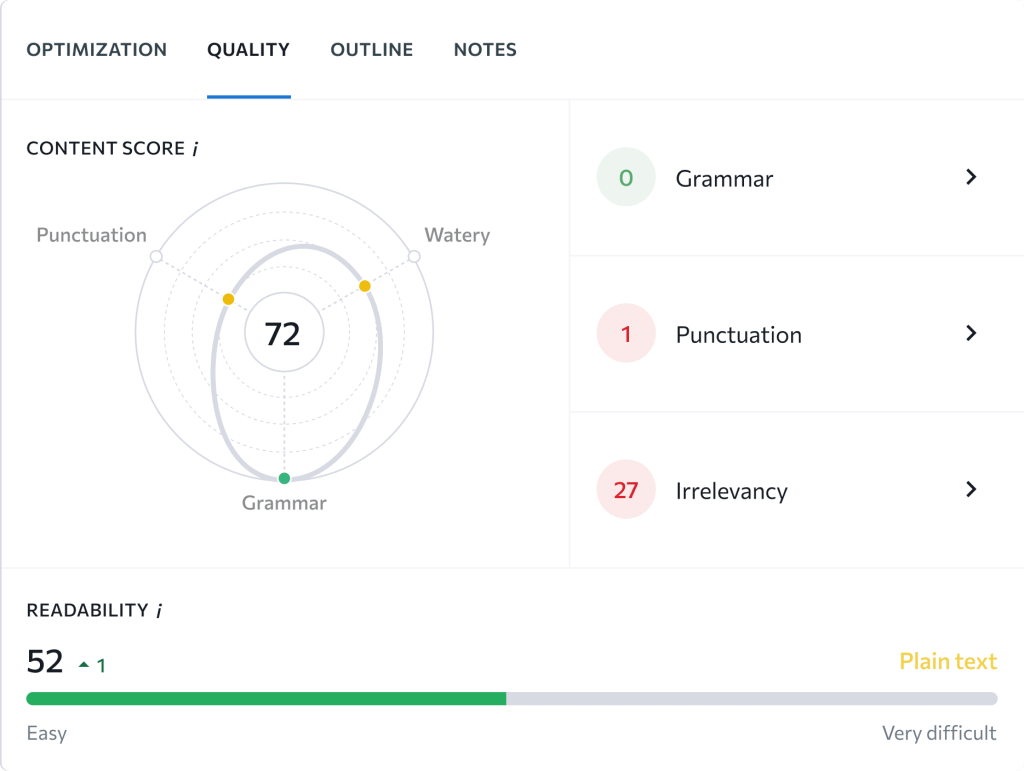
This is useful for agencies and content teams because it reduces tool-switching. Instead of bouncing between a content editor, a grammar tool, and a plagiarism checker, you can keep most checks in one place.
That said, these checks are still guardrails. They won’t fix weak reasoning, unclear examples, or missing expertise. Those are still on your editorial process.
6. Google Docs integration
If your writers live in Google Docs, SE Ranking’s integration is one of its strongest practical advantages.
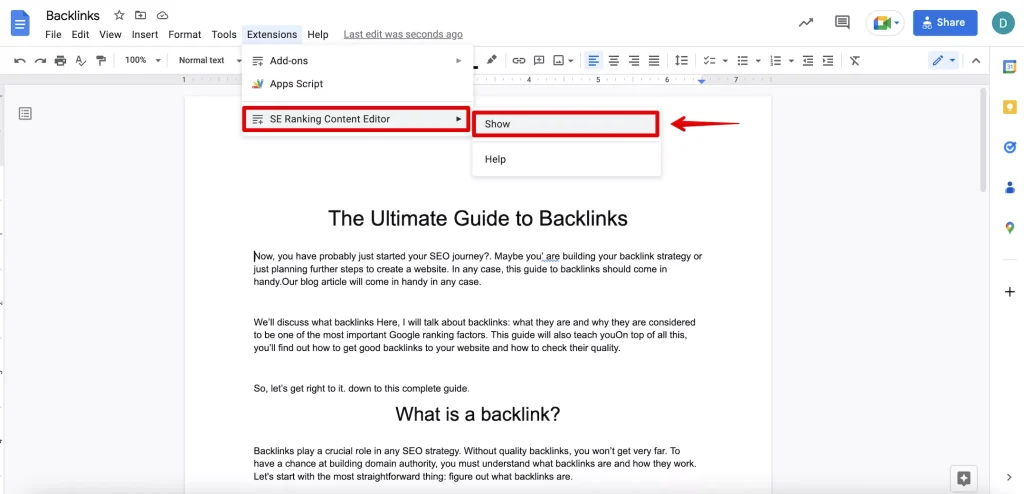
SE Ranking explicitly states its Content Editor integrates with Google Docs to help optimize text “faster and easier,” and that you can export from Content Editor and use the add-on inside Docs.
The Google Workspace listing also describes:
- an overall quality score,
- keyword suggestions (including NLP recommendations),
- readability signals,
- competitor heading structure,
- and collaborative editing.
Why this matters
Adoption goes up when you don’t force writers into a new environment. If the editor lives where they already write, you’ll get more consistent usage and fewer “SEO says we need this, but it’s not in the doc” problems.
7. AI Writer and AI Writer Wizard
SE Ranking offers two main AI writing modes:
- a step-by-step AI Writer Wizard where you input intent, audience, tone, creativity level, and desired headings or keywords.
- and a 1-click generation flow that creates a full draft with structure, optimized headings, keywords, and talking points.
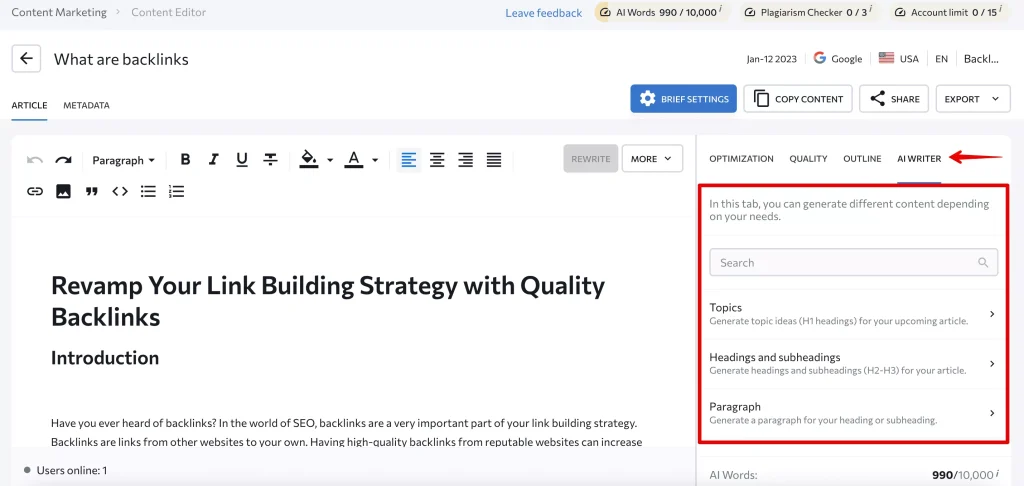
SE Ranking also positions AI Writer as capable of generating elements like FAQs and meta tags, and helping refresh content by rephrasing or expanding in a chosen tone.
My take: AI Writer is best used for speed, not final output.
A solid workflow looks like:
- build the brief
- generate a draft
- rewrite for clarity and originality
- run the optimization checks
- add proof, examples, and real-world details that AI can’t know
SE Ranking itself notes you can accept, adapt, or ignore recommendations, and that framing is exactly how you should treat AI drafts too.
8. Publishing and performance feedback loop
SE Ranking positions WordPress integration as a way to publish directly from the platform.
It also highlights monitoring performance inside Content Editor by tracking impressions, clicks, CTR, and average position, and connecting to Google Search Console for updates.
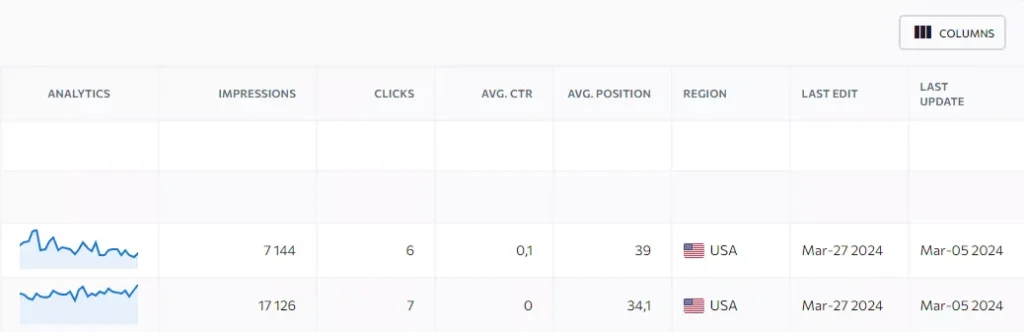
That’s helpful because it closes the loop between “we optimized this” and “did it actually perform.”
Se Ranking Content Marketing Pricing
SE Ranking sells Content Marketing as an add-on with tiers. On its pricing page, Content Marketing is described as including AI Writer, Plagiarism Checker, Brief Generator, grammar checks, GSC analytics data, Content Score, and more, with tiers shown at $29/mo, $49/mo, and $99/mo and corresponding limits for “Content Editor articles” (15/mo, 30/mo, 120/mo depending on tier).
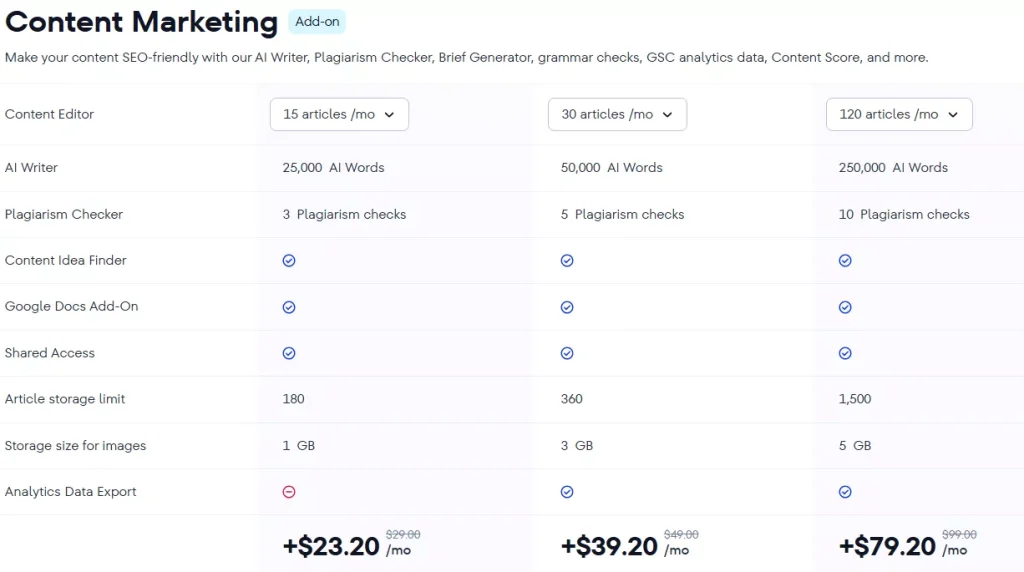
Two practical pricing notes:
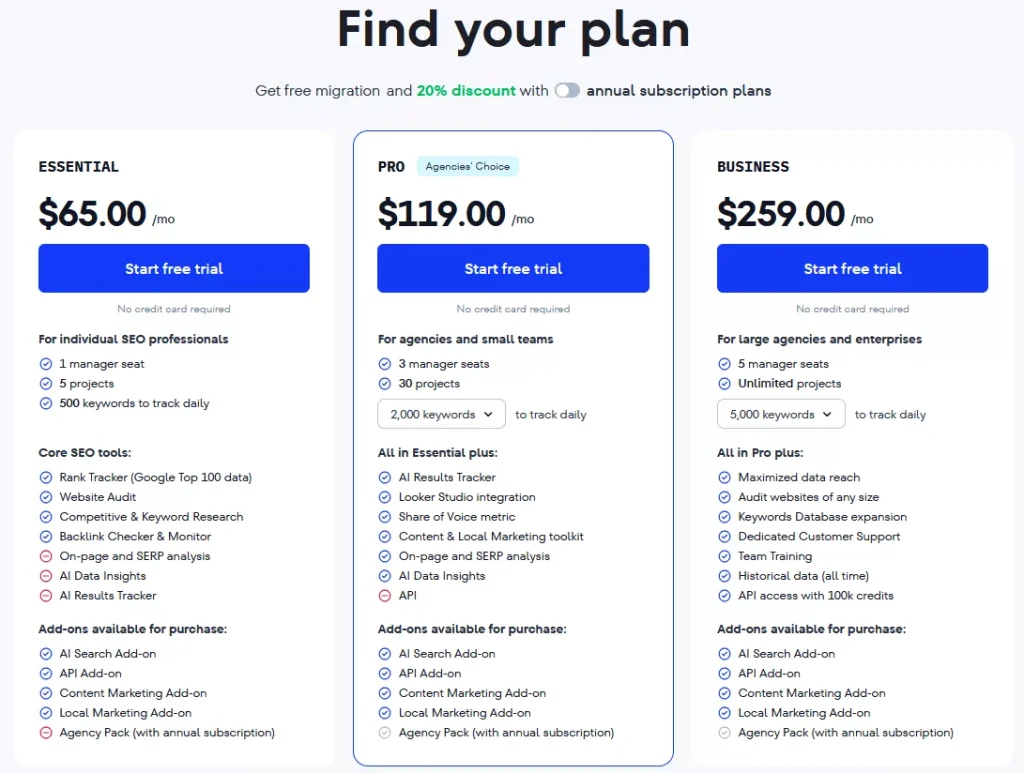
- Your “real” monthly spend depends on the base SE Ranking plan plus the add-on tier you need.
- The limiting factor for content teams is usually the number of Content Editor articles per month, so map that to your publishing cadence.
Pros and cons
Pros
- Strong SERP-based brief workflow with explicit steps for requirements, keywords, and outline building.
- Optimization loop is clear: Content Score + Brief Progress + actionable improvements.
- Built-in readability, grammar, and plagiarism checks reduce tool-switching.
- Google Docs integration is a legit adoption win for writer-led teams.
- Optional AI Writer workflows for fast drafting, plus a guided wizard.
Cons
- Like most score-based optimizers, it can encourage “checklist writing” if you don’t have editorial standards.
- AI drafts still require real editing, fact-checking, and brand voice work. (That’s true everywhere, but it’s still the main trap.)
- The add-on model means budgeting depends on both your base plan and the Content Marketing tier you’ll actually need.
Best alternative for optimizer-first workflow
If you like the idea of a brief + live scoring workflow, but you want the experience to feel more like a purpose-built content optimizer from the start, a strong alternative is Rankability’s Content Optimizer.
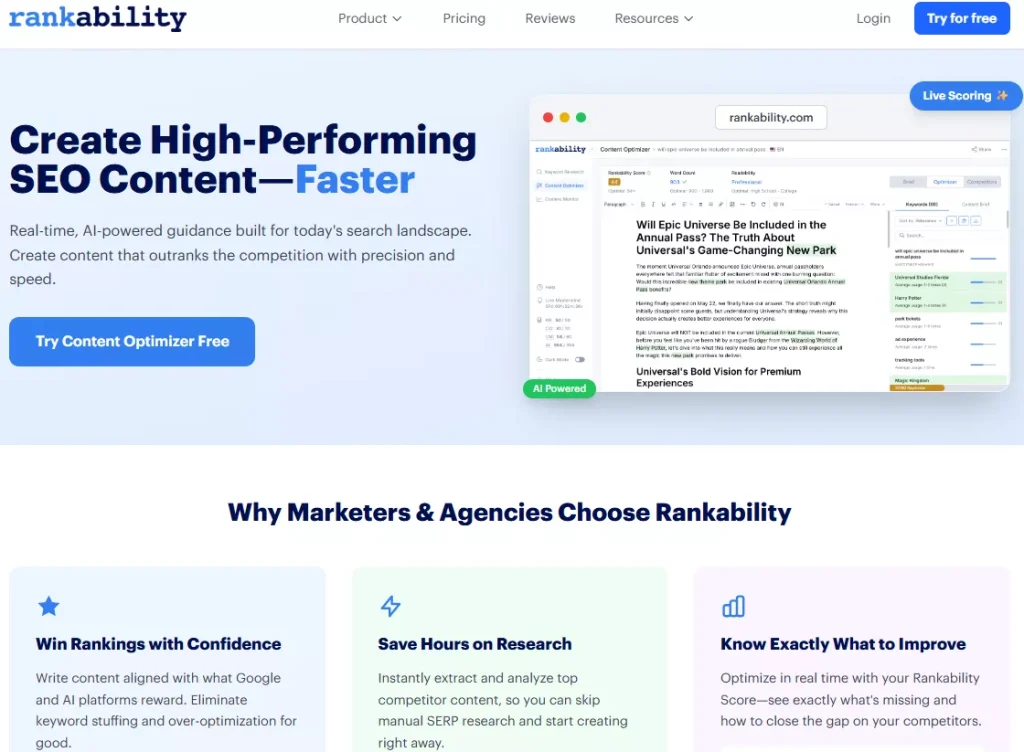
Rankability positions its workflow as:
- enter keyword or topic,
- review an AI-generated brief,
- optimize with live scoring (Rankability Score),
- refine with an in-app AI assistant,
- then publish and track.
It also emphasizes an AI-powered writing assistant for on-the-fly editing and tone matching without switching tools.
When that alternative tends to make more sense
- you’re producing content at agency pace and want an optimizer that’s the main event, not an add-on module
- you want a tighter “brief to scoring” experience that stays focused on content production
(And if you’re already happy with SE Ranking’s all-in-one platform approach plus Docs integration, you may not need to switch at all.)
FAQs
Is SE Ranking’s Content Editor good for refreshing old content?
Yes. SE Ranking positions the Content Editor as letting you enter a URL or paste a draft to get a plan to optimize content for higher rankings, including guidance on keywords, terms, images, and questions to address.
Can writers stay in Google Docs?
Yes. SE Ranking provides a Google Docs add-on workflow via exporting from Content Editor and using the extension in Docs.
Does the AI Writer replace a human writer?
No. SE Ranking’s AI Writer can generate drafts and components fast, but you still need humans for accuracy, originality, POV, and credibility. SE Ranking frames many parts of the process as recommendations you can adapt or ignore, and that’s the right mindset for AI output too.
Conclusion: is SE Ranking worth it for content optimization?
If you want a content optimization workflow that starts with SERP-driven briefs and ends with a measurable Content Score and progress checklist, SE Ranking’s Content Editor is a solid option. It’s especially compelling if your writers prefer Google Docs, and you want one system that covers brief creation, optimization guidance, quality checks, and performance monitoring.
The biggest determinant of success won’t be the score itself. It’ll be whether your team uses the tool to build clearer briefs, cover topics more completely, and then adds the human layer that content scores can’t measure: experience, examples, and a point of view.
If you want, paste your current draft intro and headings for this post and I’ll rewrite it to match the pacing and section style of the Frase review format you referenced, including a clean “verdict” section and screenshot placeholders.