

SEO PowerSuite is best known as a desktop SEO toolkit, but its content optimization capability is more legit than most people expect.

Inside WebSite Auditor, the Content Editor combines competitive benchmarking, on-page copywriting checks, and keyword guidance into a single workflow designed to help you ship pages that match what’s already working in the SERP.
This review focuses only on SEO PowerSuite’s content optimization features, specifically the Content Editor and TF-IDF driven recommendations in WebSite Auditor.
Quick summary
SEO PowerSuite’s Content Editor is an “optimize with evidence” workflow: pick a page (or create a new one), map target keywords, let the tool analyze competitors in the SERP, then write and adjust based on optimization rate, keyword usage cues, and TF-IDF-informed recommendations.
Where it’s especially helpful
- Updating an existing service page that’s close to ranking but missing topical coverage
- Creating a detailed copywriting brief you can hand off to a writer (without buying another tool)
- Agencies that want a repeatable, desktop-based “audit → optimize → export” loop
What SEO PowerSuite’s content optimization is
In practice, “SEO PowerSuite content optimization” means using WebSite Auditor’s Content Editor (under Page Audit) to draft or refine page content while benchmarking against competitors across the SERP.
You also get a TF-IDF workflow that helps surface topically relevant terms pulled from competitor pages, so you can enrich content without guessing what language Google associates with the topic.
Who it’s best for
- SEOs who want competitor-based guidance while they write (not after)
- Teams that prefer a desktop tool and straightforward, exportable deliverables
- Agencies that need to produce structured writing tasks and page drafts for clients
Who may need more
- Teams that want real-time cloud collaboration and approvals inside the editor
- Writers who want AI drafting built into the same interface (SEO PowerSuite is more “optimize what you write” than “generate the draft for you”)
Feature Breakdown
1. Competitor-driven research & SERP benchmarking
Content Editor’s analysis is rooted in what’s ranking. It selects competitor pages from the SERP for your mapped keywords and lets you review and refine the competitor set before you optimize.
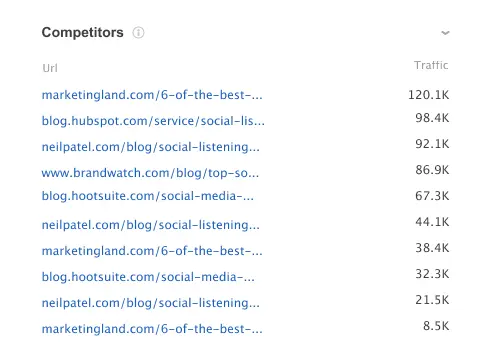
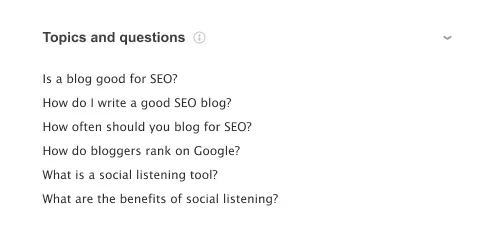
It also surfaces extra competitive insight inside the editor, including page previews, People Also Ask-derived topics/questions, and a word cloud of frequently used terms.
How to use it (quick SOP)
- Map a tight set of keywords to the page you’re optimizing.
- Review the competitor list and remove outliers.
- Pull only the PAA questions you’ll genuinely answer (don’t pad the page).
2. Content Editor setup (keywords, modes, snippet fields)
You can optimize an existing URL or create a new page, then enter the target keywords you want the page to rank for.
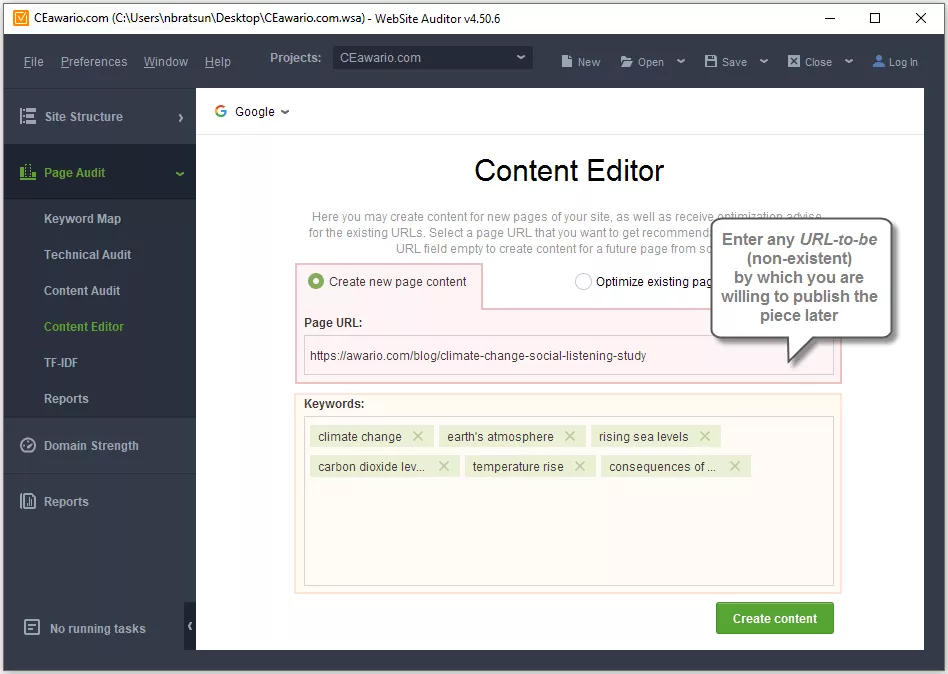
A practical detail: you can edit in Browser mode (renders the page with markup/styles) or Document mode (clean text, images, and links). This is useful when you want to strip distractions and focus on copy.
It also includes fields to edit meta title and meta description, with recommended character limits, a SERP snippet preview, and competitor snippet benchmarking for ideas.
3. Optimization guidance (Optimization Rate, keyword usage, TF-IDF + recommended terms)
While you edit, the tool calculates an overall Optimization Rate and flags major issues via alerts, plus guidance around word count relative to competitors.

Keyword guidance is presented as “chips” for mapped keywords with color-coded status (OK / almost there / alarm), plus counts versus recommended usage. You can also highlight keyword instances in the text to spot overuse fast.
For topical enrichment, the Recommended Keywords section pulls terms from competitors (aligned with the TF-IDF workflow), and you can customize or add/remove terms as needed.
4. Copywriting tasks (PDF handoff)
One of the most agency-friendly features is the ability to generate a downloadable PDF with detailed copywriting or rewriting guidelines.
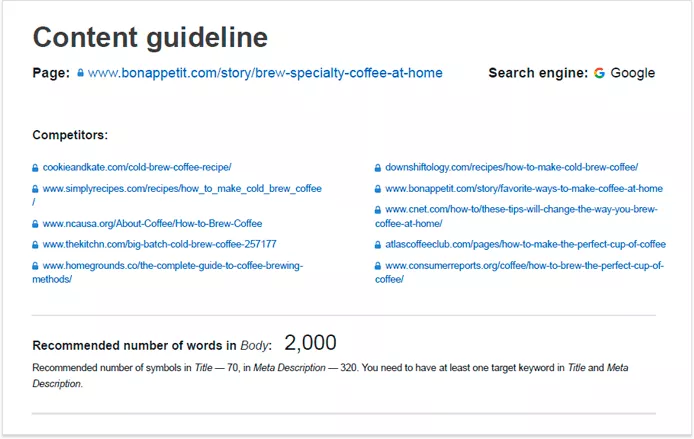
You can customize expected word count, keyword targets, and topics/questions, then hand the PDF to a writer as a ready-made task.
5. Export & publishing (HTML export, keeping audits fresh)
After optimization, you can export the final copy as HTML for uploading to your site or importing into a CMS.

You can also update the analysis later to refresh competitors, recommendations, and TF-IDF data as the SERP changes.
Real-world use cases
- Service pages: tighten the meta snippet, align headings to what ranks, and fill topical gaps using competitor-informed terms.
- Content refreshes: re-run analysis, find missing sections/questions, and update copy without rewriting from scratch.
- Agency production: create a PDF brief for writers, then export optimized HTML to hand off to implementation.
Performance notes, learning curve, and pitfalls
Learning curve is moderate: the interface is clear, but you’ll get the most value when you’re disciplined about competitor selection and you treat keyword guidance as guardrails, not a checklist to “green” everything.
Main pitfall: it’s easy to drift into keyword-count thinking because the UI shows exact counts and warnings. Use TF-IDF/recommended terms to improve coverage, but keep readability and intent as the real goal.
Pricing
SEO PowerSuite offers a free tier (with limits) and paid tiers that include in-app content optimization.
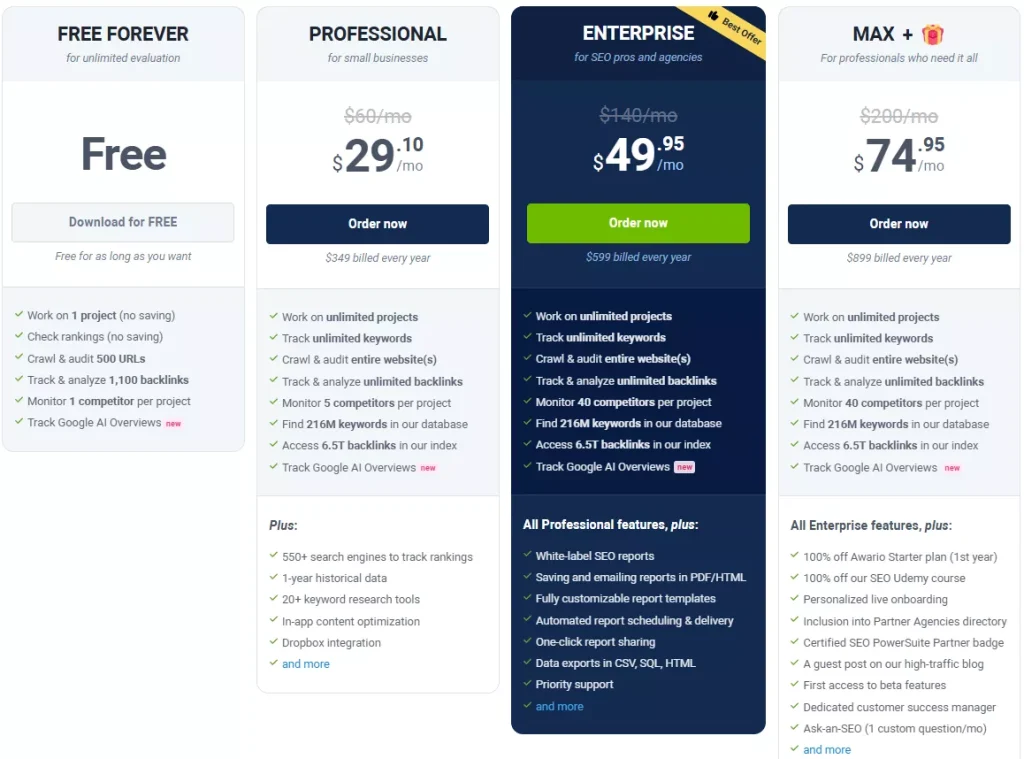
On the current pricing page, Professional is listed at $349 billed yearly, Enterprise at $599 billed yearly, and Max+ at $899 billed yearly (which includes all Enterprise features plus add-ons like onboarding and a dedicated customer success manager).
Pros & cons
Pros
- Competitor-driven optimization with PAA topics/questions in the workflow
- Strong handoff mechanics: export copywriting tasks as PDF
- Practical publishing path: export optimized content as HTML
- Useful snippet editing support (limits + preview + competitor benchmarking)
Cons
- The interface pushes keyword usage counts, which can tempt “score chasing”
- It’s not a modern collaborative web editor, it’s a desktop workflow
- No native AI drafting inside the Content Editor (it’s built to optimize what you write)
Where SEO PowerSuite fits among content editors
SEO PowerSuite’s Content Editor is best viewed as a SERP-benchmarking, audit-first content editor that’s especially handy if you already like SEO PowerSuite’s ecosystem and want optimization + deliverables (PDF briefs, HTML exports) in one place.
If you want a cloud-first content workflow with built-in drafting and editorial collaboration, you’ll probably prefer a dedicated content optimization platform like the top tools for optimizing content for SEO.
If you want a practical “analyze competitors, optimize, export” system that lives inside a broader SEO toolkit, SEO PowerSuite fits.
SEO PowerSuite Content Editor vs Rankability Content Optimizer
If you like the idea of optimizing for topic coverage without being nudged into keyword counting, Rankability’s Content Optimizer is a strong alternative.
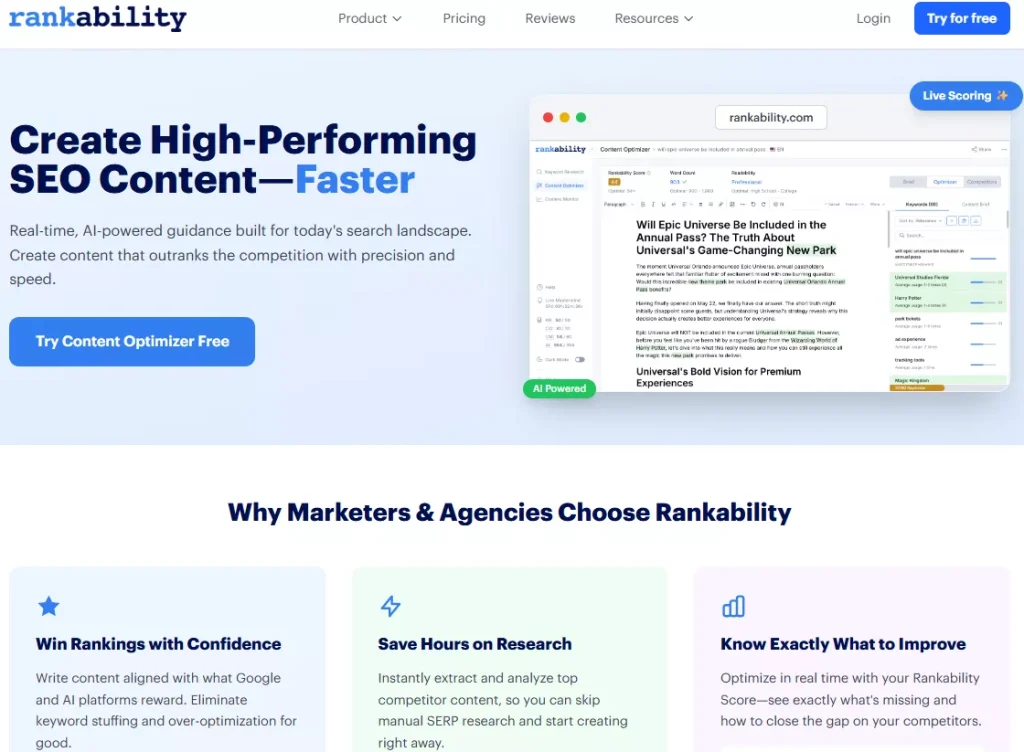
It uses a real-time topic coverage score, generates briefs/outlines, includes an in-app AI assistant for polishing, and is built around a “brief → optimize → publish” flow.
How Rankability differs
- Topic coverage scoring (less pressure to repeat exact phrases)
- Built-in brief + outline generation and writing assistance in the same interface
- Designed as a dedicated content optimizer workflow (rather than a module inside a broader desktop suite)
Pick SEO PowerSuite when: you want a desktop tool, competitor-based guidance, and exportable PDF/HTML deliverables inside a broader SEO suite.
Pick Rankability when: you want a cleaner, topic-first content optimization loop with live scoring and a more modern writing workflow.
FAQ
Does SEO PowerSuite help with meta title and meta description optimization?
Yes. Content Editor lets you edit meta title/description, see recommended character limits, preview the SERP snippet, and benchmark against competitors’ snippets.
Can I hand this off to a writer cleanly?
Yes. You can generate and download a PDF with copywriting/rewriting guidelines and send it as a task.
Can I export the finished page for publishing?
Yes. You can export the final copy as HTML for upload or CMS import.
Verdict
As a content optimization feature set, SEO PowerSuite’s Content Editor is a practical, competitor-driven system for tightening on-page content, filling topical gaps, and producing writer-ready briefs and exportable drafts.
If you’re already in the SEO PowerSuite ecosystem (or you want a desktop-first workflow that still supports serious content optimization), it’s worth using.