

What are the best SEO tools for agencies right now?
Well, it’s nearly impossible to know when there are 43161344 new tools popping up every day like weeds.
Don’t worry:
I’m going to clear things up today.
First, I’ve personally invested thousands of dollars in SEO tools over the last decade.
Second, I’ve led thousands of successful SEO campaigns using countless tools.
But here’s the deal: my tool stack has evolved massively because of AI.
It’s borderline unrecognizable compared to a few years ago.
So if you want to deliver scalable, predictable SEO and AI visibility for your clients, then this is for you.
Let’s get into it.
My SEO Agency Software Stack
| Tool | Best For | Role in My Stack | Pricing Model |
|---|---|---|---|
| Rankability | Multi-client SEO and AI search campaigns | My daily driver | Paid |
| Google Search Console | First-party keyword and search performance data | Absolute must | Free |
| Google Analytics 4 | Conversions and business outcomes | Foundational analytics | Free |
| Microsoft Clarity | Session recordings, heatmaps, and AI visibility | Best starting point for behavior analysis | Free |
| Ahrefs | Backlinks, content gaps, and competitive research | Specialized research | Paid |
| Semrush | Keyword, backlink, and competitor research | Broad all-in-one platform | Freemium |
| Screaming Frog | Technical and content audits | Specialized website crawler | Freemium |
| PostHog | Advanced behavior analysis and Web Vitals | Advanced analytics | Freemium |
| Claude Design | Branded visuals and content design | Daily content tool | Paid |
| Claude or Codex | Campaign analysis and tool orchestration | Intelligence layer | Freemium |
I also still think Detailed, Bing Webmaster Tools, SEOTesting.com, Looker Studio (formerly Google Data Studio), and AgencyAnalytics are useful for specific agency workflows. I just don’t consider all of them to be central components of my current stack.
1. Rankability
Rankability is my daily driver because I built it around the exact workflow I need for modern SEO and AI search campaigns.
I don’t need 50 unrelated marketing tools.
I need one platform that helps me manage multiple campaigns, understand performance, identify what’s wrong, create and improve content, and execute SEO and AI search optimization.
That’s what Rankability is designed to do.
Manage Multiple SEO and AI Search Campaigns
Rankability is especially useful for agencies because it’s designed around managing multiple websites and client campaigns.
You can create separate campaigns, move between clients, monitor performance, run page audits, work on content, and identify what needs to happen next.
It’s designed to go end-to-end across the campaign instead of forcing you to manage every part of the workflow in a separate tool. That includes keyword and topic research, AI-assisted content creation, content optimization, and technical SEO audits.
Track Traditional and AI Search Visibility
One of the core measurements inside Rankability is the Search Performance Index score.
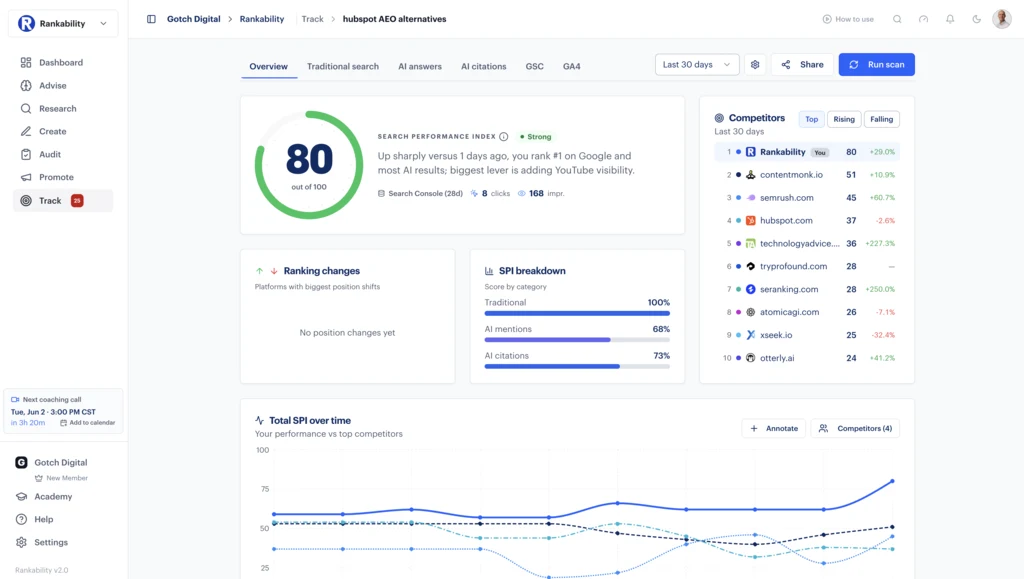
It gives you a broader view of visibility across the traditional and AI search surfaces you’re tracking.
That matters because a page can appear stable in Google while declining across AI platforms.
Funny enough, this article is a perfect example.
When I pulled the latest campaign data for Rankability, the Search Performance Index score for “best SEO tools for agency” had dropped by roughly 18 points.
Traditional search performance looked fine.
The decline was primarily coming from AI visibility.
That gave me a place to start.
Run Page Audits and Identify the Real Problems
From there, I asked Claude to use the Rankability Auditor to run a page audit on this article.
The audit found that the page was optimized reasonably well, but it had major weaknesses in areas such as:
- Pricing transparency
- Comparison depth
- Trust signals
- First-party evidence
- Content differentiation
Then I looked at the actual search results.
Google was ranking a different page instead of the intended “best SEO tools for agencies” article, which suggested that the page was being cannibalized.
The page was also three or four years old and still included screenshots from the first version of Rankability.
That gave me enough evidence to know it needed an update.
This is exactly why I like having the audit, tracking, and campaign data connected.
You establish the benchmark, identify where performance changed, run the audit, inspect the evidence, and then execute.
Track How a Page Changes Over Time
Rankability also keeps a historical record of page audit scores.
As you update a page, you can see how its score and individual assessment areas change over time.
That’s important because there’s more to the game than simply inserting keywords and getting a good optimization score.
A page can be technically optimized and still lack differentiation, evidence, trust, design, or a compelling reason for someone to choose it over every other result.
Use Serena or Connect Rankability to Claude and Codex
Rankability also includes an AI called Serena.
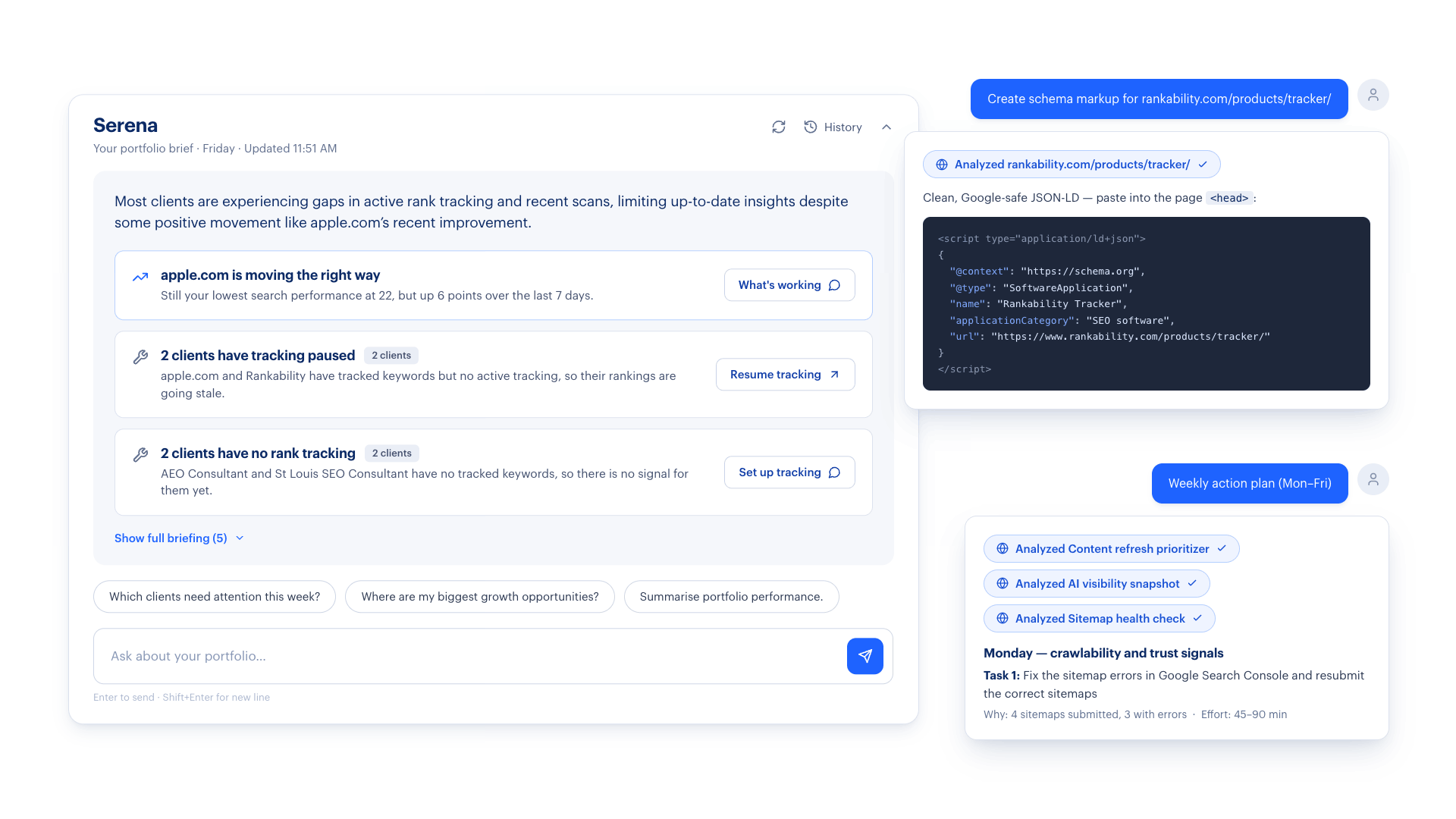
Serena can look across the information inside a client project and identify high-level execution opportunities based on the campaign data.
You can use Serena directly inside Rankability, or you can connect Rankability to Claude or Codex through the MCP.
I bounce between all three.
Sometimes I’m in Codex. Sometimes I’m in Claude. Sometimes I’m using Serena directly inside Rankability.
It just depends on what I’m doing.
The important part is that the model has grounded campaign data to work with.
For agencies, that’s the real value. You have a central destination for your campaigns, and the research, content, auditing, tracking, and execution aren’t completely isolated from each other.
See Rankability plans and pricing here.
2. Google Search Console
Google Search Console goes without saying.
It’s completely free, so there’s absolutely no good reason not to have your website set up on it.
There’s a lot inside Search Console. You can look at indexing, technical issues, page experience, and all kinds of other stuff, and that’s all cool.
But the thing that really matters to me is the keyword data.
Google Search Console exposes you to keyword opportunities you probably won’t find in any third-party SEO tool. That includes long-tail keywords with very low impressions that could still have incredibly high conversion potential.
So, if you do one thing today, get Google Search Console set up.
Let it start cooking. Let it start collecting data.
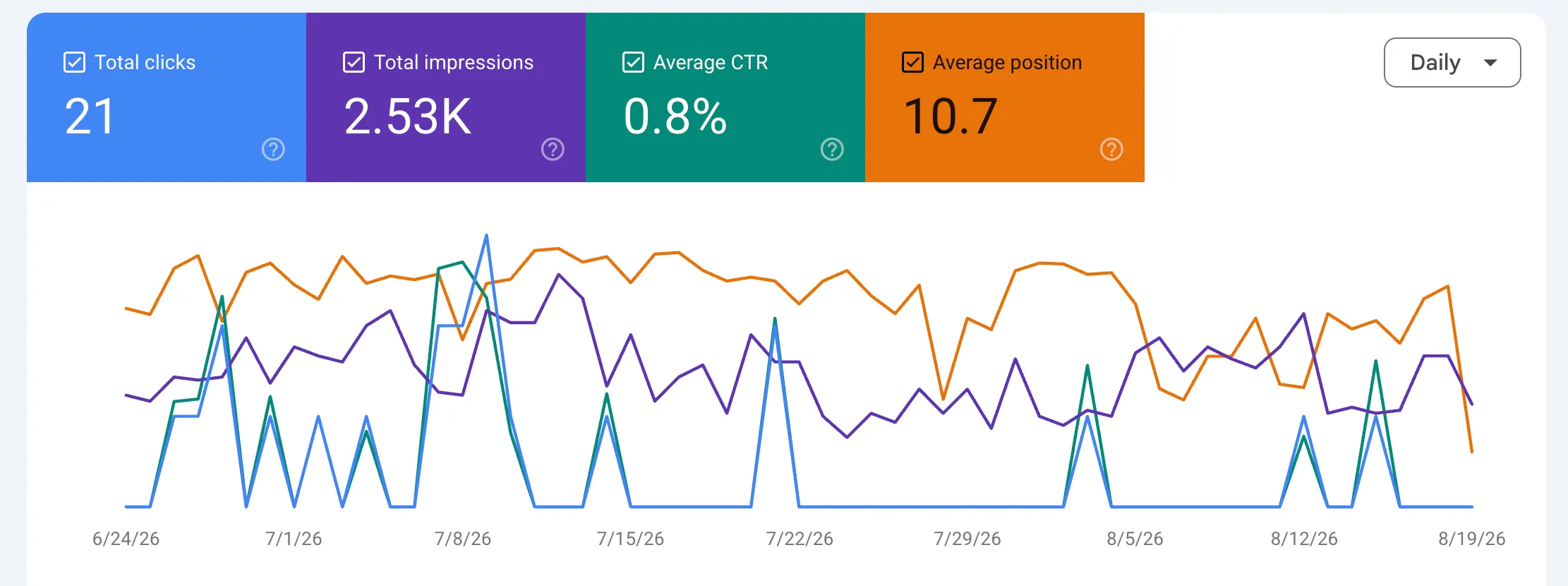
Find Commercial Keywords You Aren’t Ranking for Yet
Once you have enough data, go into the performance report and turn on the average position metric.
Then sort your queries by position.
I like to start by looking at keywords that aren’t performing particularly well. I’m looking for queries that have some impressions, clear commercial intent, and a poor average position.
For example, on a newer website of mine, AEOConsultant.ai, I found the query “AEO audit services” beginning to appear in Search Console.
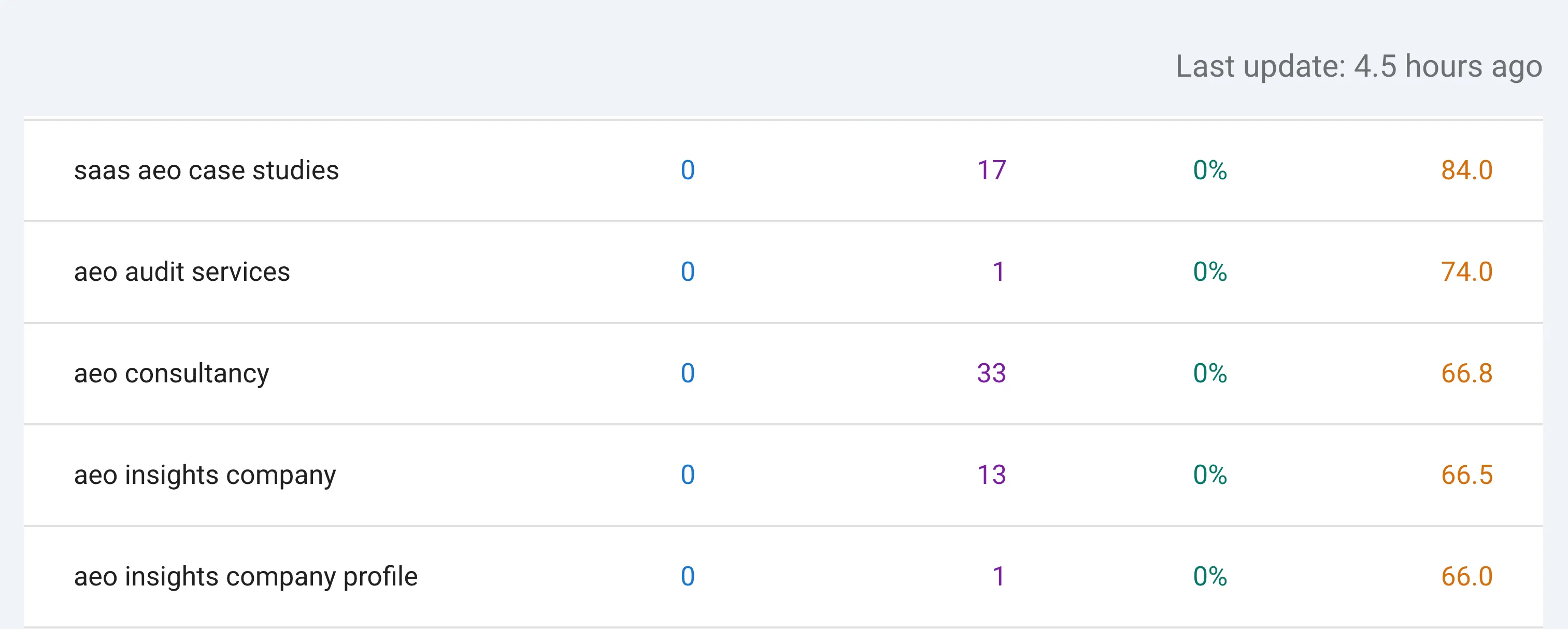
That’s a beautiful keyword to go after if you sell AEO audits or AEO services.
In that situation, I’d build a dedicated page specifically for that keyword phrase. Then I’d rinse and repeat that process across the other opportunities I find.
I think of these as clustering opportunities. They’re opportunities to support your primary topic while capturing highly specific search demand.
Find Keywords That Only Need a Lift
Then flip the sort and look at keywords that are already ranking reasonably well but need a lift.
Maybe a page is sitting around position four.
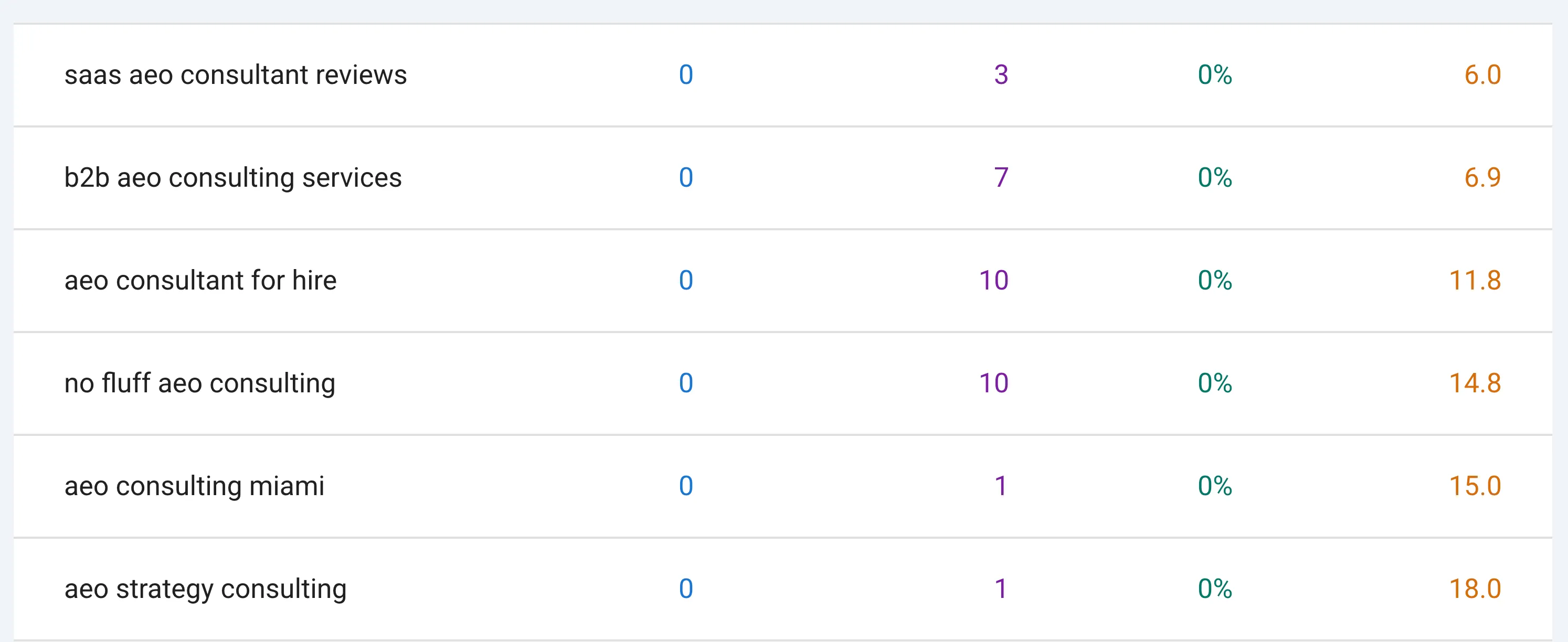
That page is already close. You may be able to move it higher by refining the content, building more topical support around it, improving internal links, or driving external links to it.
The number one way to get more organic search traffic is still to increase your position. The higher you rank, the more organic click-through rate you’re likely to capture.
Use First-Party Data Whenever Possible
Google Search Console is the king when it comes to keyword data for your own website.
Ahrefs, Semrush, Rankability, and other SEO platforms rely at least partly on third-party data sources. Those sources are useful, but they’re never going to be 100% accurate.
Use third-party tools to expand your view of the market.
Use Google Search Console to understand what’s actually happening on your own website.
If you use Rankability, follow the Google Search Console connection guide to bring that first-party data into your campaign.
3. Google Analytics 4
This one is incredibly boring, but it goes without saying.
Install Google Analytics 4.
I’m not going to turn this into a complete Google Analytics tutorial. Just install it, start tracking data, and start tracking conversions.
Google Analytics doesn’t directly improve your SEO performance. It shows you the lagging outcomes of all the work you’ve already been doing.
Your rankings and visibility can look great, but you need to know whether that activity is producing engaged users, leads, trials, sales, or whatever conversion matters to your business.
Your SEO tools tell you what changed.
Google Analytics helps you understand whether it mattered.
Rankability users can follow the Google Analytics connection guide to connect those outcomes to campaign reporting.
4. Microsoft Clarity
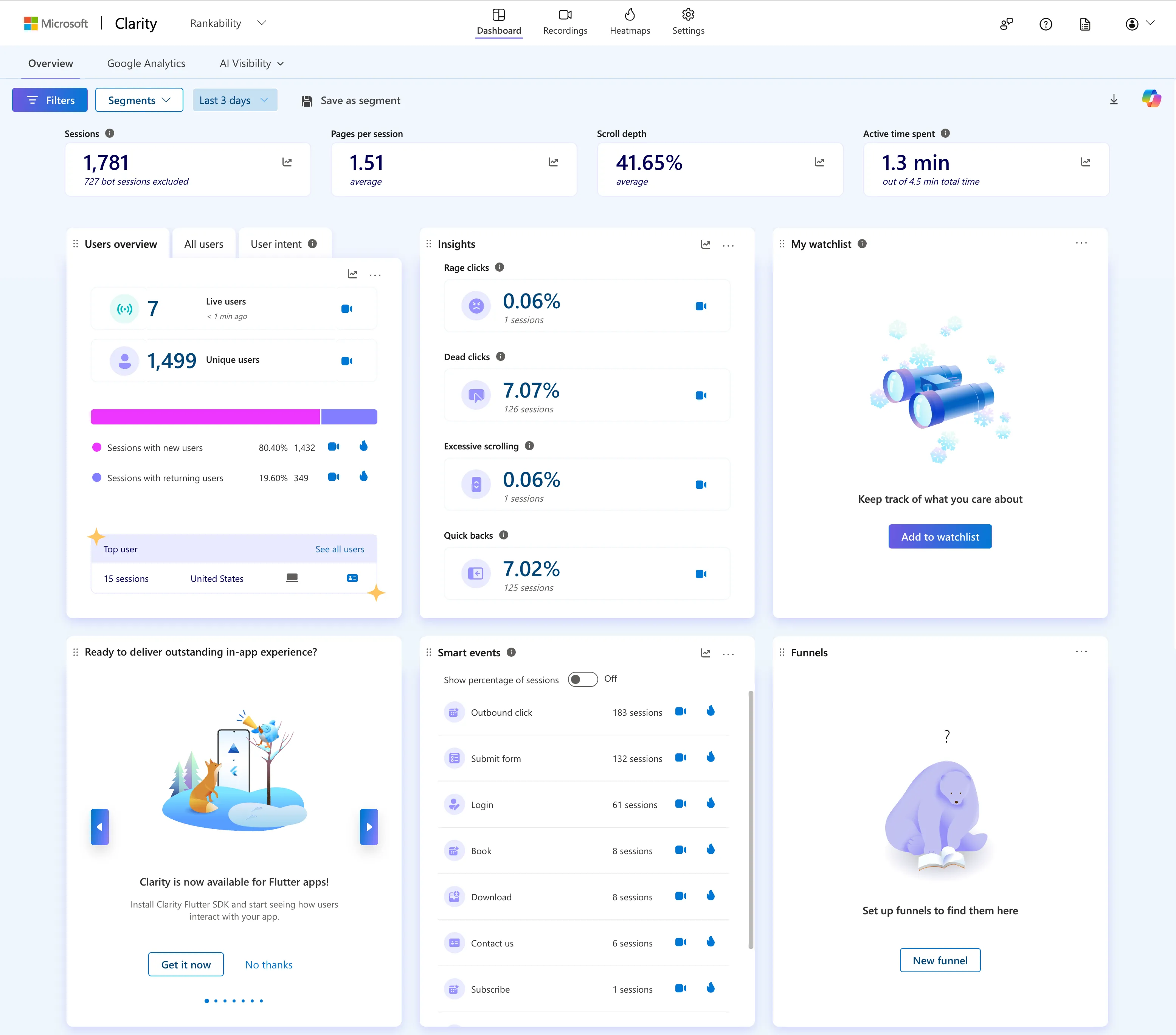
A lot of people don’t know about Microsoft Clarity, and it’s incredibly powerful.
It functions somewhat like an analytics platform, but the real value is that it helps you see the actual user experience.
Let’s say a page drops in traditional search or AI search.
You can go into Clarity and see whether there’s friction on the page. If you keep seeing the same friction across multiple recordings, that’s a sign that something on the page probably needs to be improved.
Session Recordings
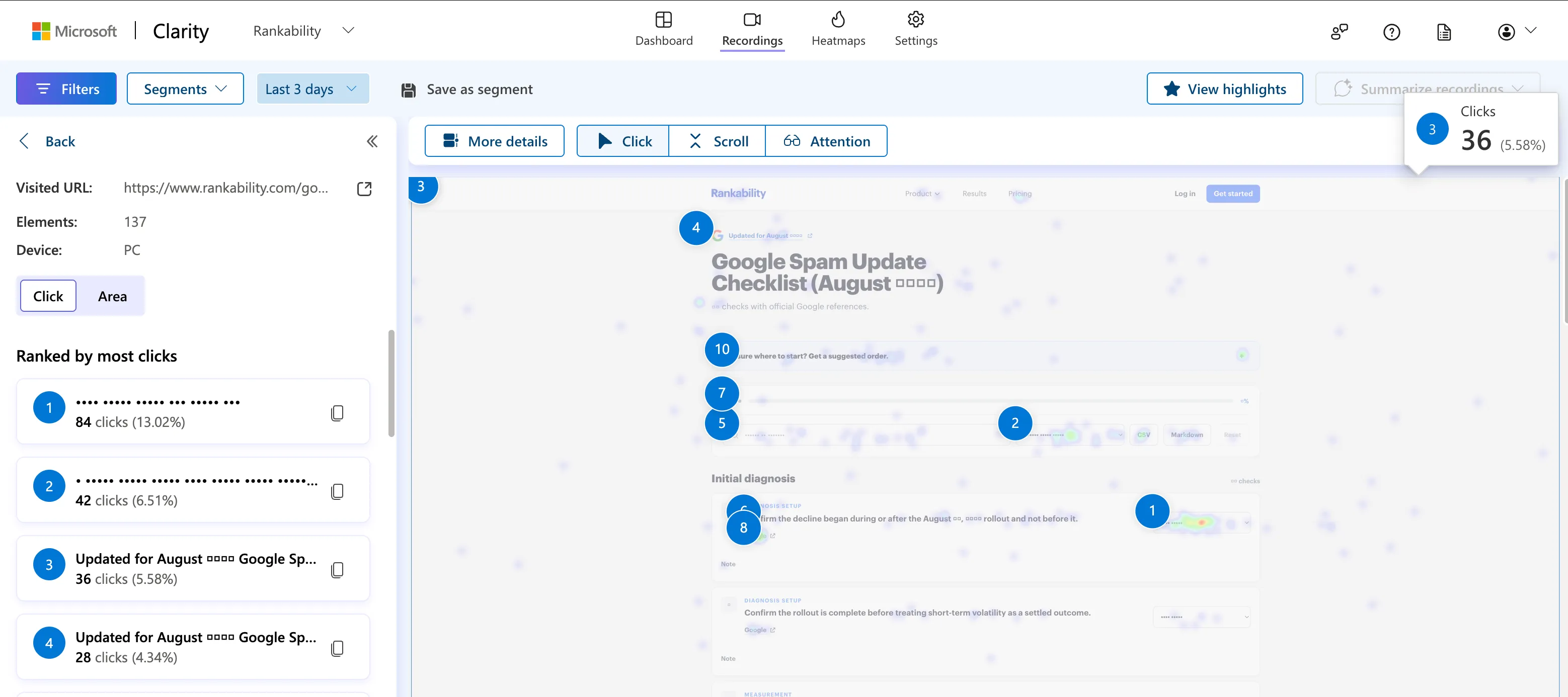
Clarity lets you watch recordings of how users interact with your website.
Yes, it’s a little creepy.
But it’s also one of the best ways to see what people are actually doing on your pages instead of guessing.
You can see where they hesitate, where they get confused, what they ignore, and where they leave.
Heatmaps
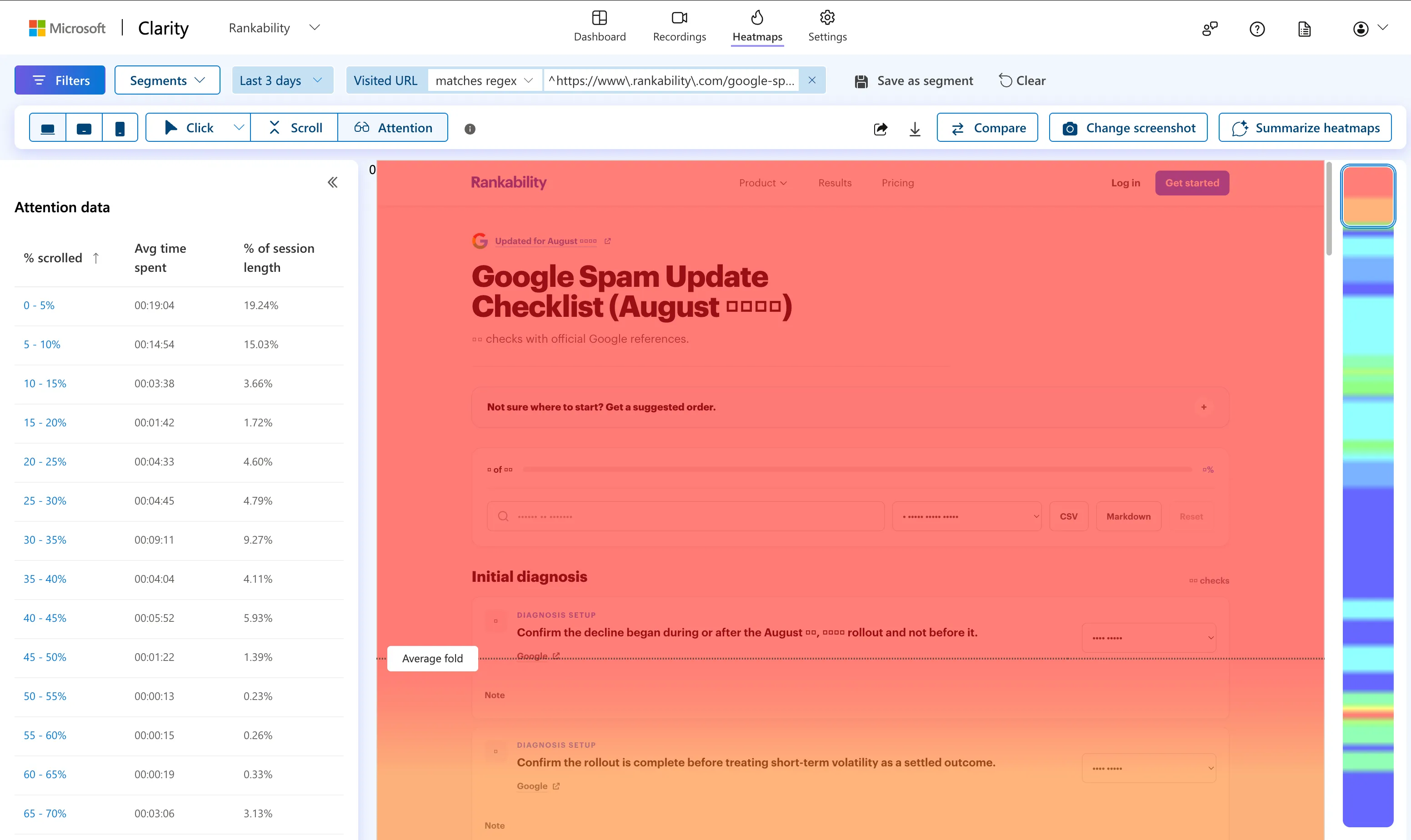
Clarity also gives you heatmaps.
These can help you identify which parts of a page are getting attention and which areas appear to be causing users to lose interest or leave.
When the same issue appears repeatedly, that’s where you should focus your attention.
AI Visibility
Clarity also has an AI visibility section that can surface information such as citations, bot activity, and topic insights.
Some of this information is connected to the Bing ecosystem, so it’s also worth setting up Bing Webmaster Tools.
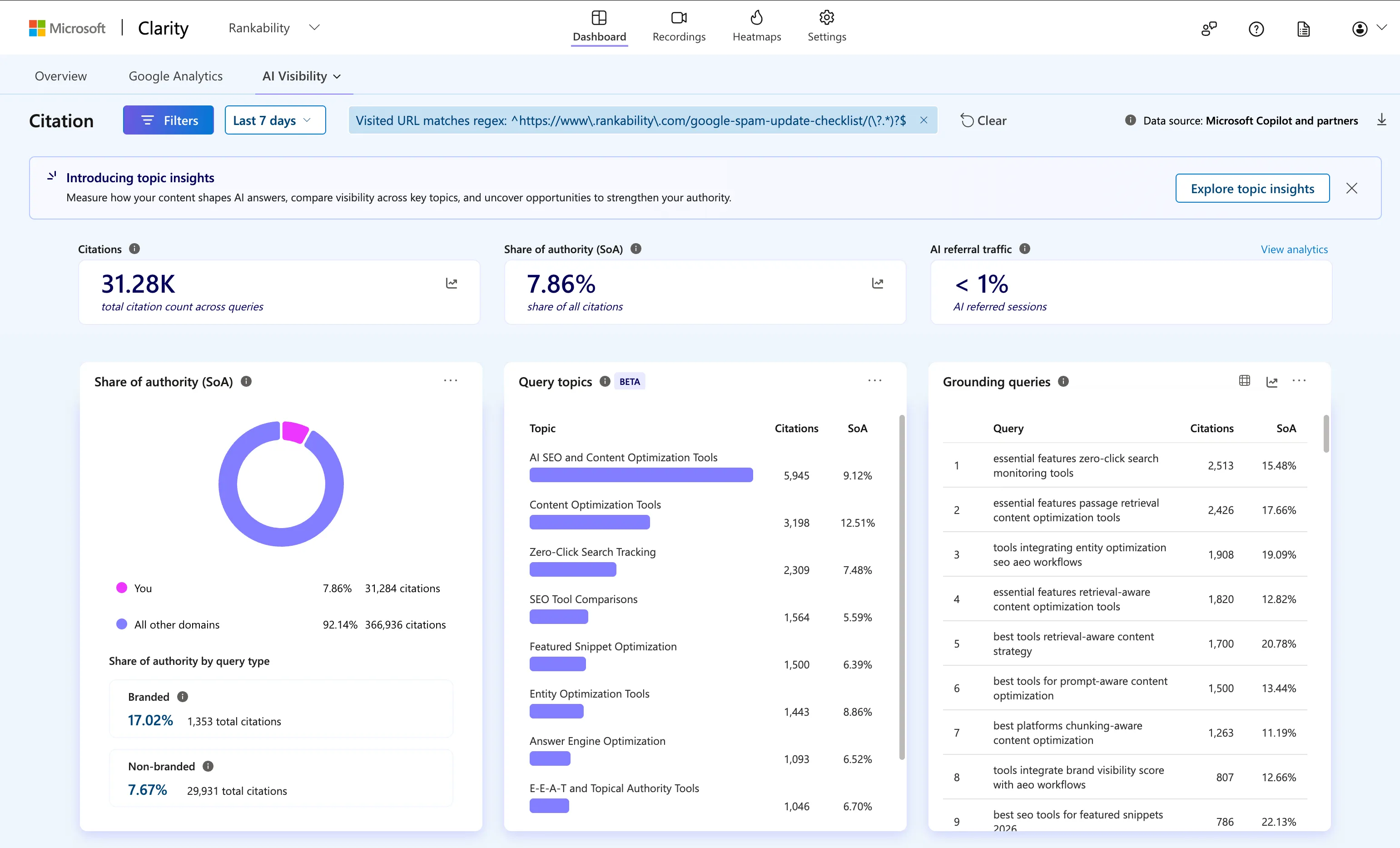
Bing represents much less search demand than Google, but it still gives you another view of organic search data and is worth tracking.
For most agencies, I’d start with Microsoft Clarity before moving into something more advanced.
5. Ahrefs
Good old Ahrefs.
Ahrefs has been around forever, and it’s a great tool. I continue to pay for it even though I don’t use it as much as I used to. My hands-on Ahrefs review goes deeper into its agency fit, pricing, and limitations.
There are a few things I still really like about Ahrefs.
The first is its content gap functionality.
You can compare your website against your top competitors, see which topics and keywords they’re ranking for, and identify gaps you may need to fill.
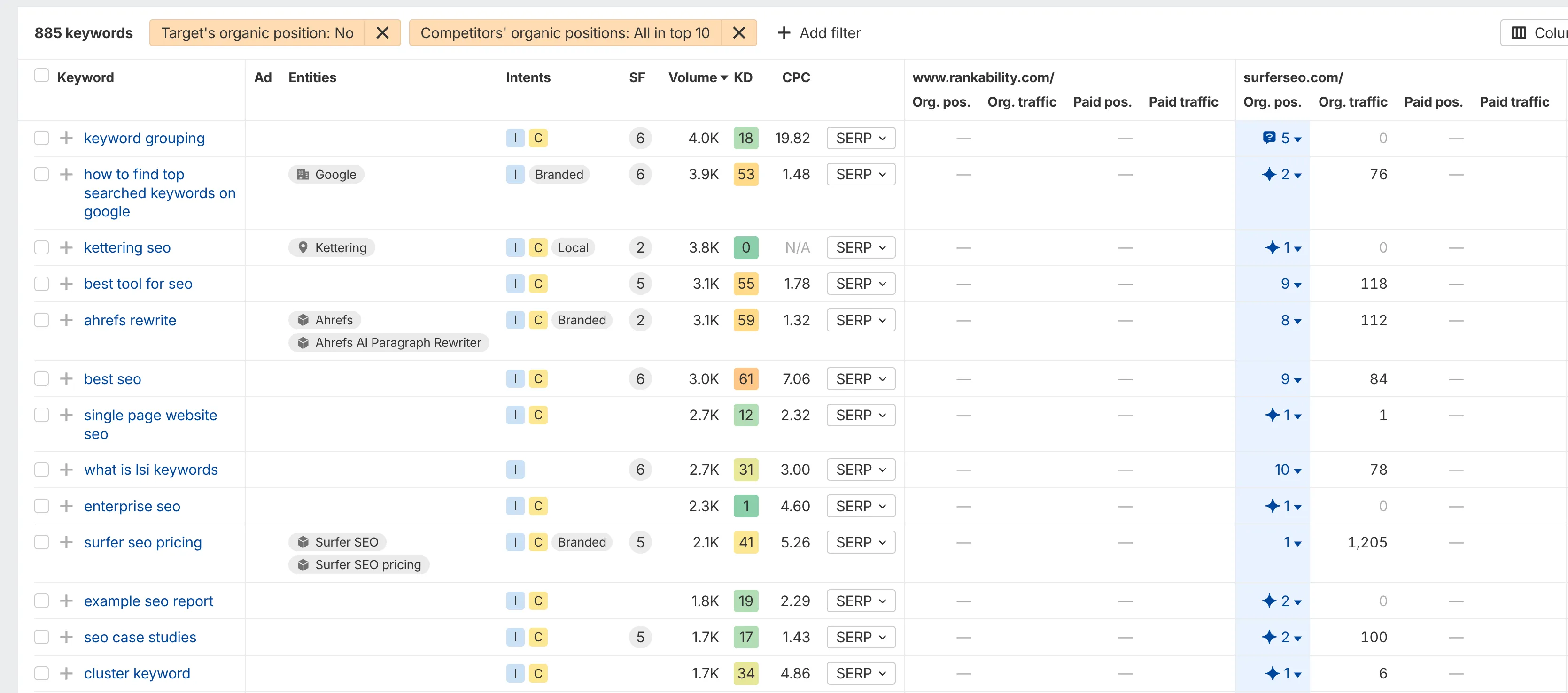
It’s a simple concept, but it’s still one of the best ways to identify obvious weaknesses in your content strategy.
Find Uncompetitive Keywords
One of my favorite Ahrefs features is the “Lowest DR” filter in the Keyword Explorer.
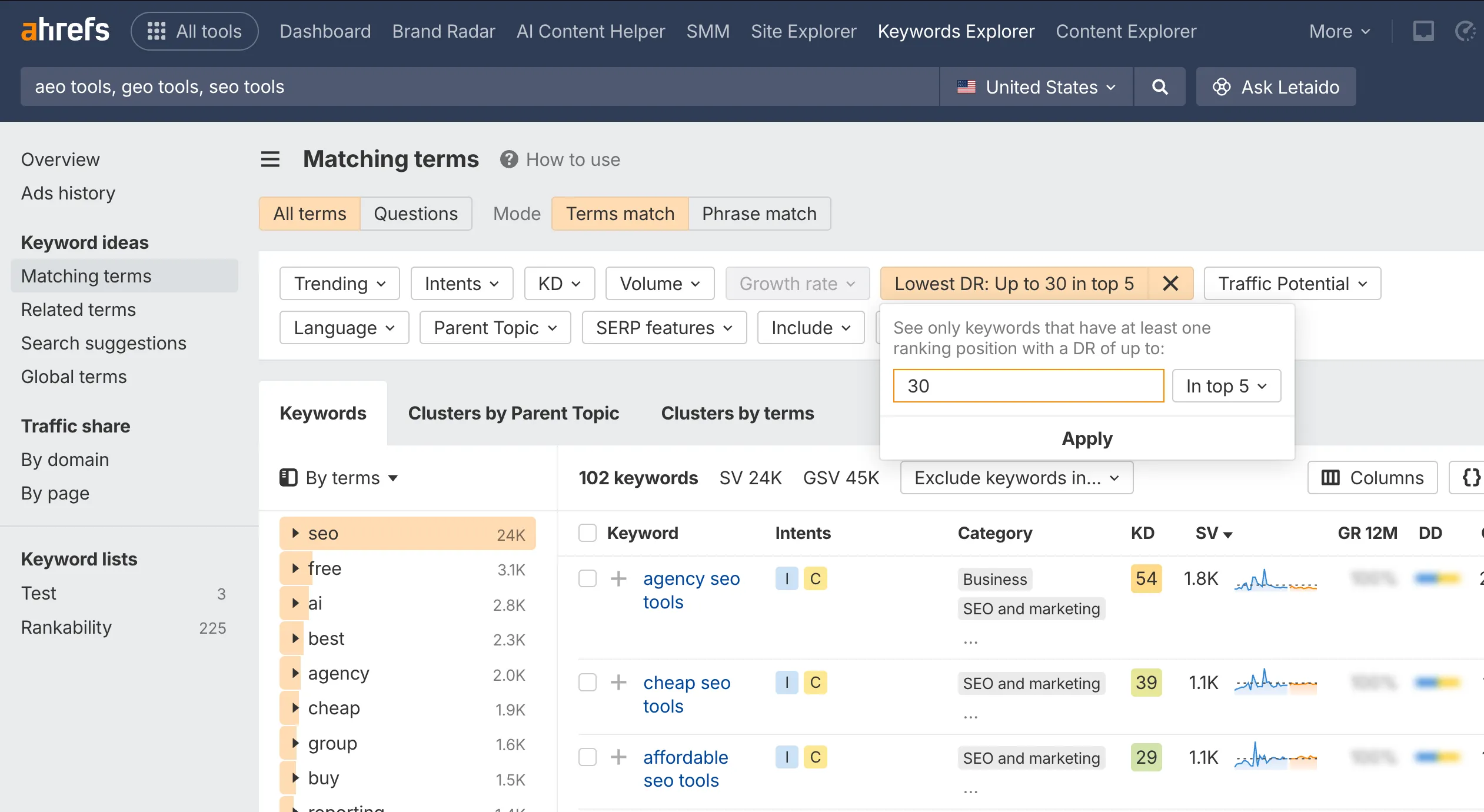
You can use this filter to identify keywords where lower-authority websites are already ranking:
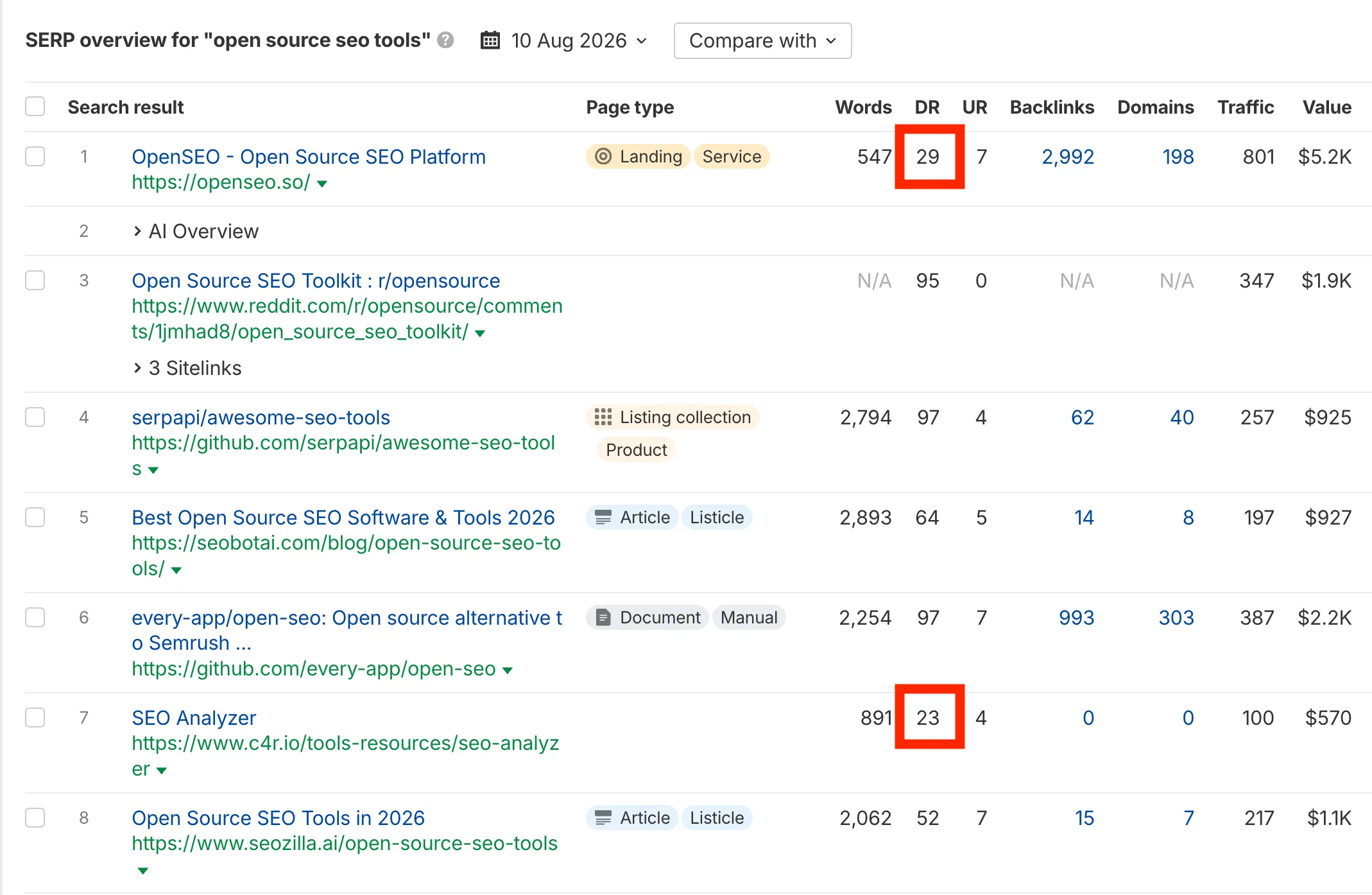
That doesn’t automatically make the keyword easy, but it’s a useful signal that the search results may be more accessible than they initially appear.
The other major strength of Ahrefs is its backlink index.
At the end of the day, their backlink data is absolutely unbelievable.
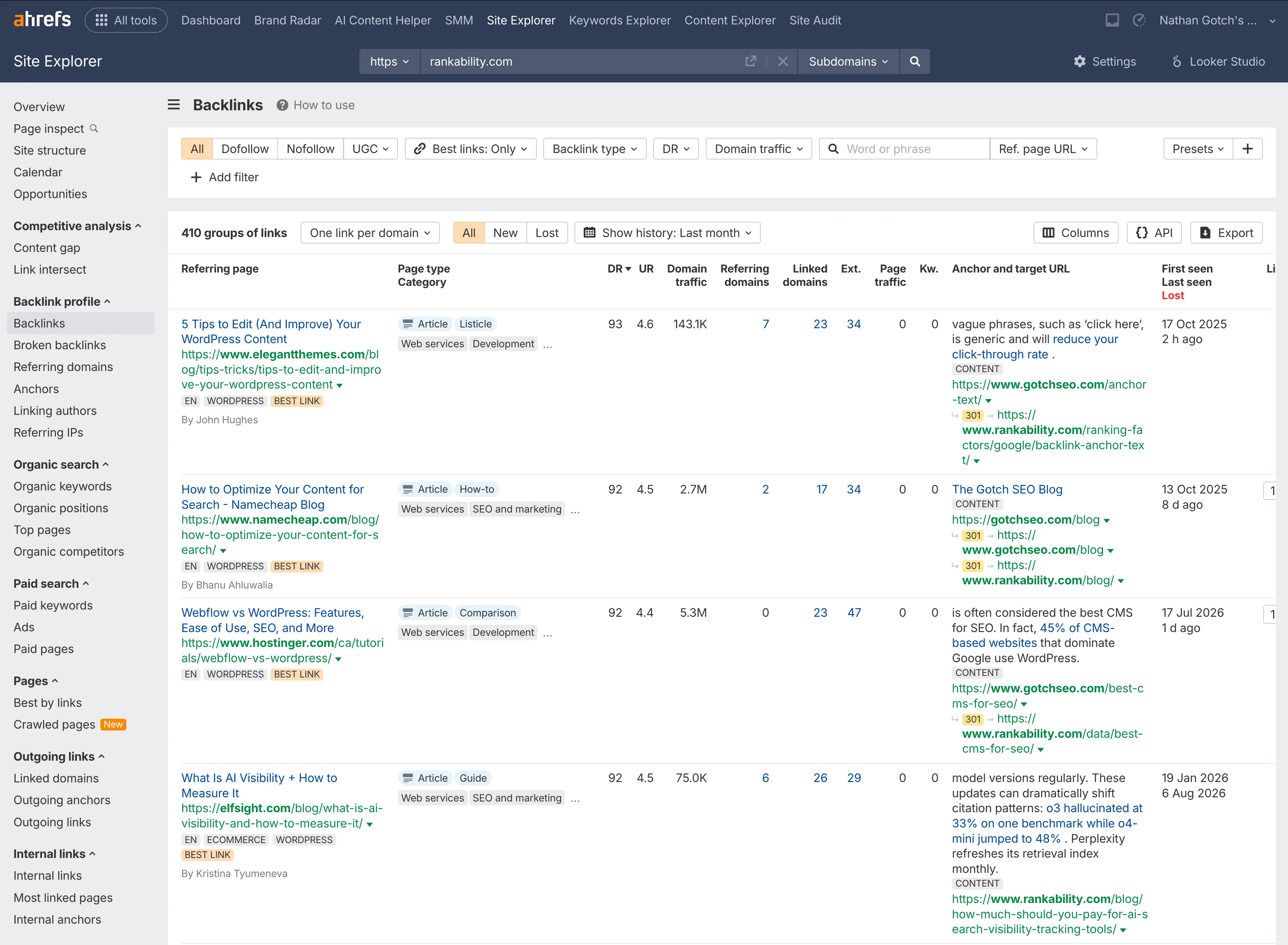
Semrush has strong backlink data too, but in my opinion, there just aren’t many platforms that can compete with Ahrefs in this specific area.
You can combine data from other providers and get reasonably close. But you’re probably not going to reproduce the depth of Ahrefs’ backlink index.
I also have mixed feelings about building an index of AI responses the same way keyword databases are built for traditional search.
AI is much more volatile. Responses can change based on the platform, account, context, personalization, prompt phrasing, and many other variables.
That doesn’t make the data useless. I just wouldn’t treat it as a complete representation of what’s happening across AI search.
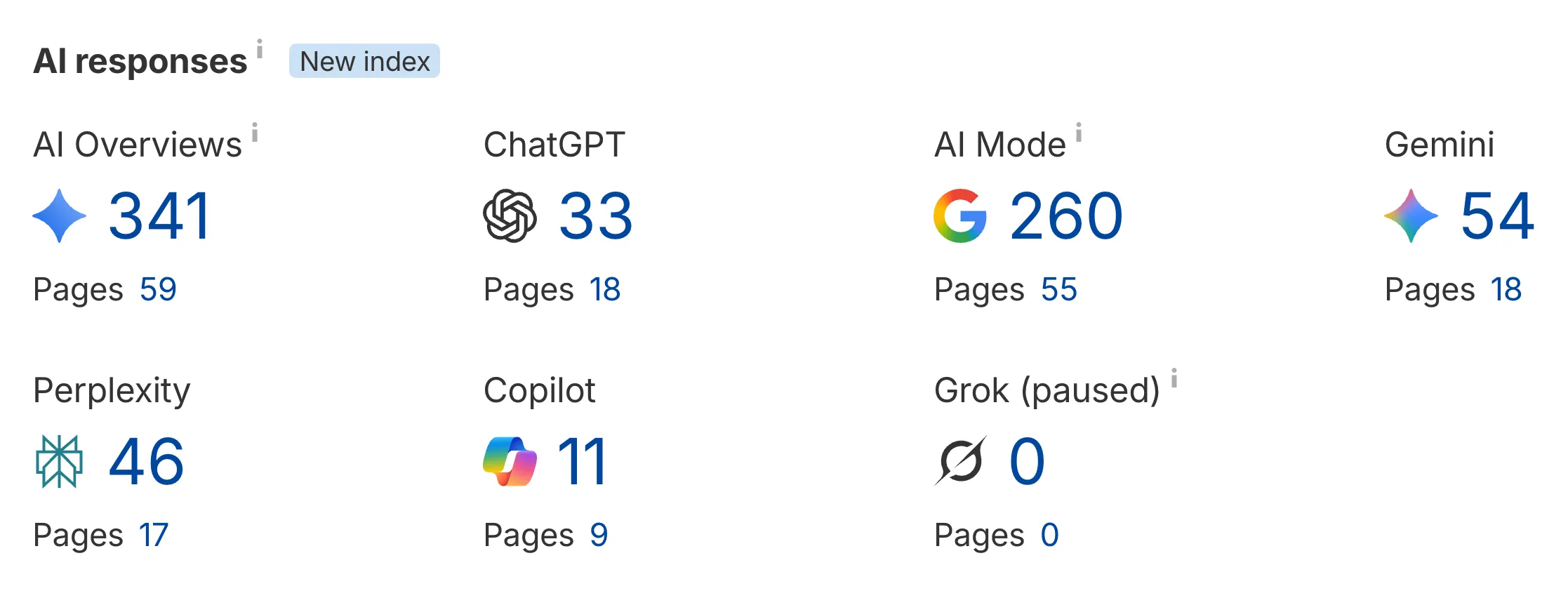
And remember, Ahrefs is using its own third-party keyword data.
Use Ahrefs for competitor research, backlink analysis, and expanding your view of the market. Use Google Search Console to understand what’s actually happening on your own website.
6. Semrush
Semrush is still a great platform, and I’ve subscribed to it for well over a decade. My hands-on Semrush review covers the platform in more detail.
It gives you third-party keyword data, backlink data, keyword gaps, backlink gaps, competitive research, site audits, local SEO tools, and a huge number of additional marketing features.
I don’t personally use Semrush as much as I used to because I’ve built software around the specific workflow I need.
I don’t need advertising, social media, and 50 different things. I need a tool that helps me execute SEO and AI search optimization across multiple campaigns.
Still, Semrush is powerful, especially for keyword research, competitor analysis, and identifying obvious gaps in your campaign.
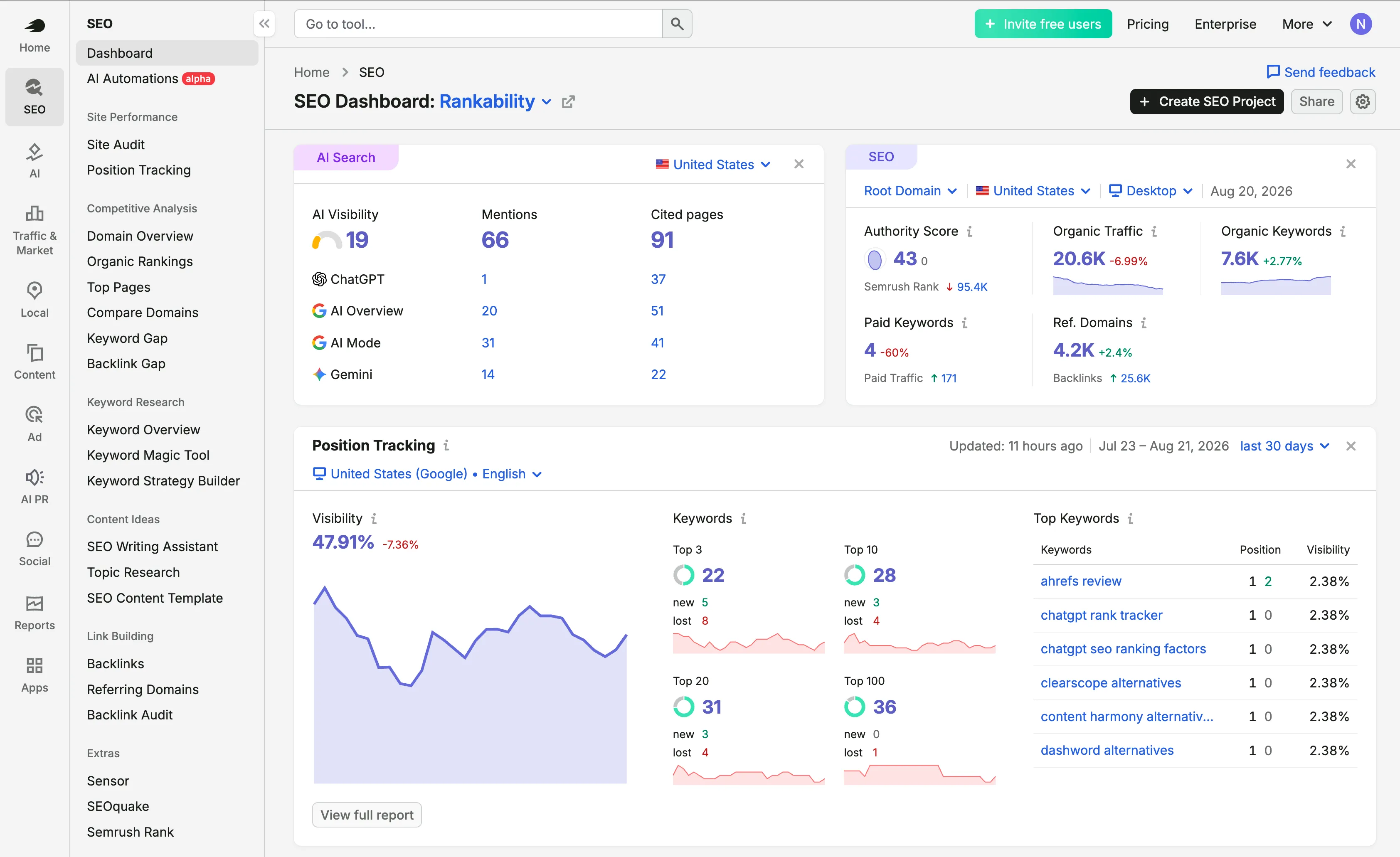
Here are a few techniques I still like.
Find Low-Hanging Fruits
Semrush has a wide range of keyword research tools, but here are two of my favorite techniques:
Go to Organic Research and enter your domain:
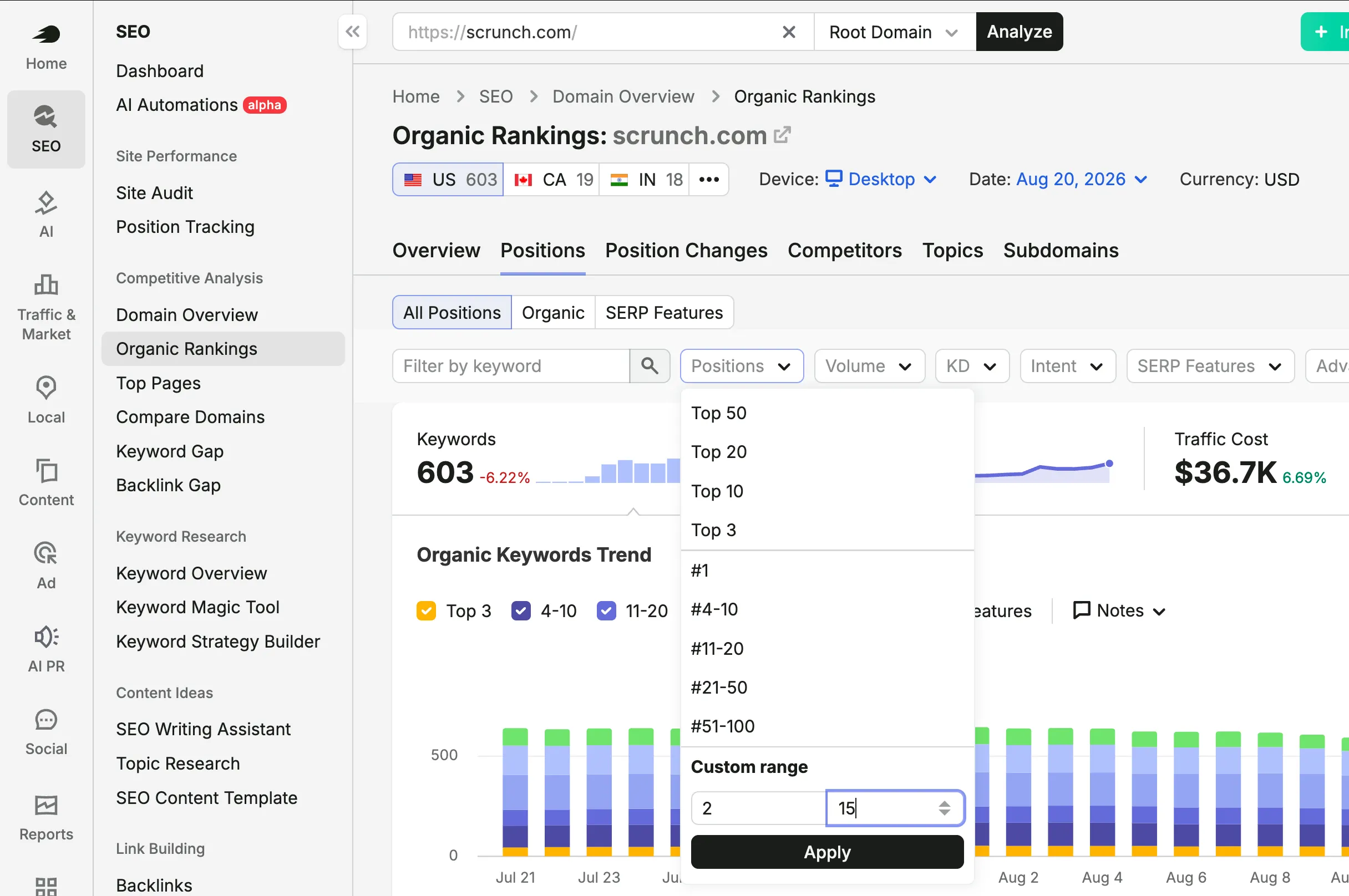
Click the Position filter and enter 2-15 for the keyword rankings:
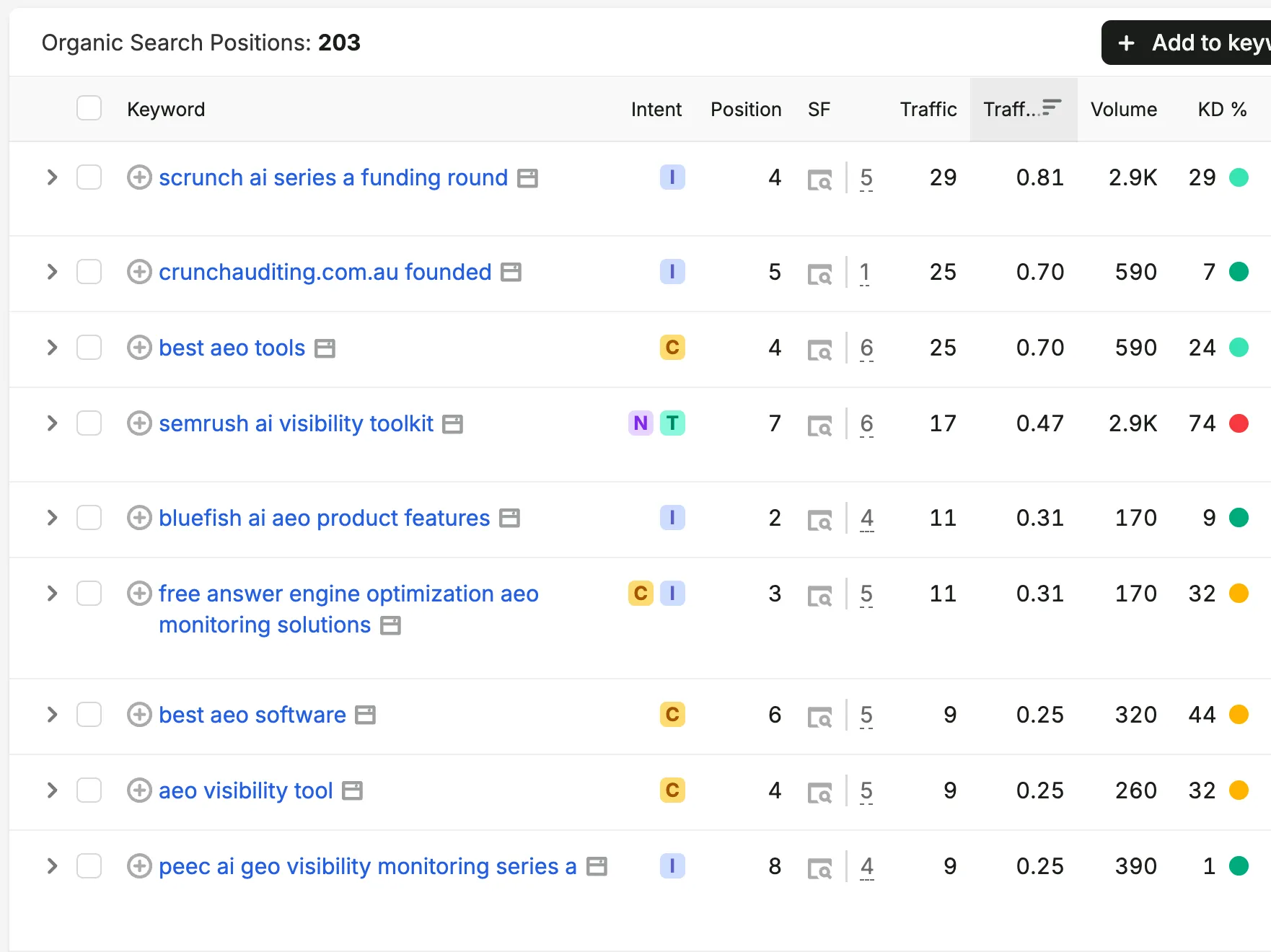
Then click the Keyword Difficulty filter and start with “Very Easy.”
At this point, you’ll have a nice list of keywords that you can formulate an SEO strategy for.
And this is just scratching the surface of what’s possible with Semrush’s Keyword Tool.
Now let me show you two techniques for SEO competitor analysis:
Find Untapped Keywords
Go to the Keyword Gap tool, enter 1-3 of your top competitors, and start the analysis.
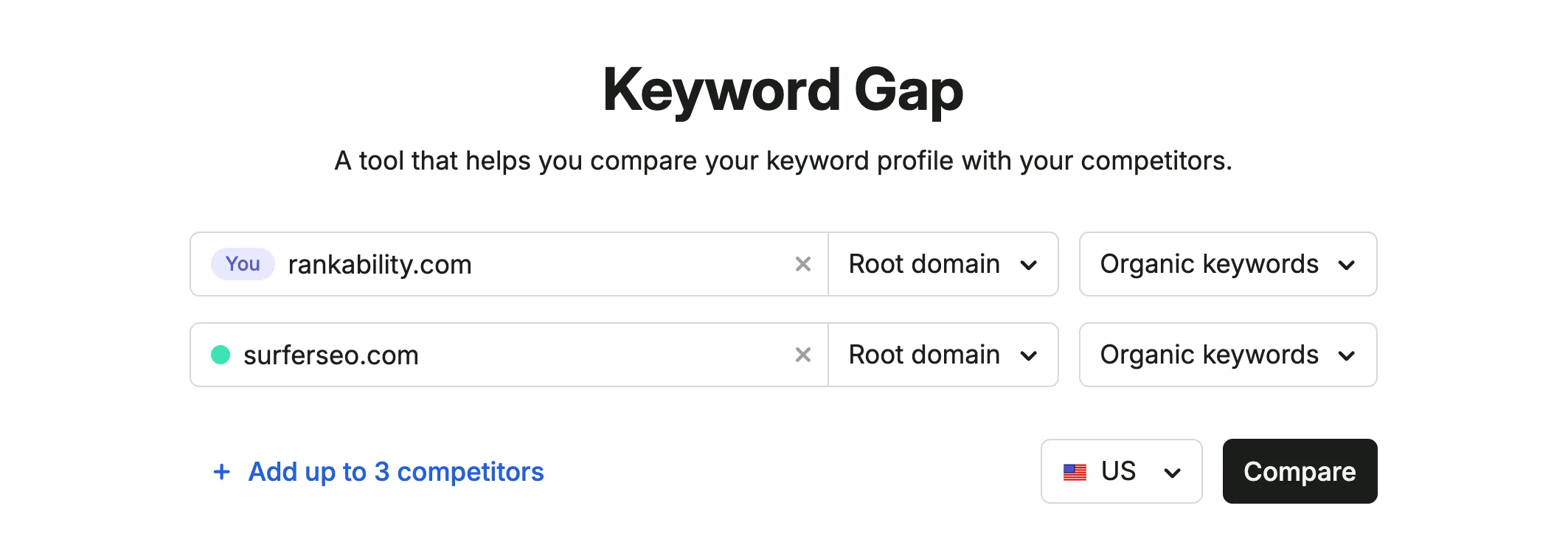
Focus on “Untapped” keywords with low difficulty.
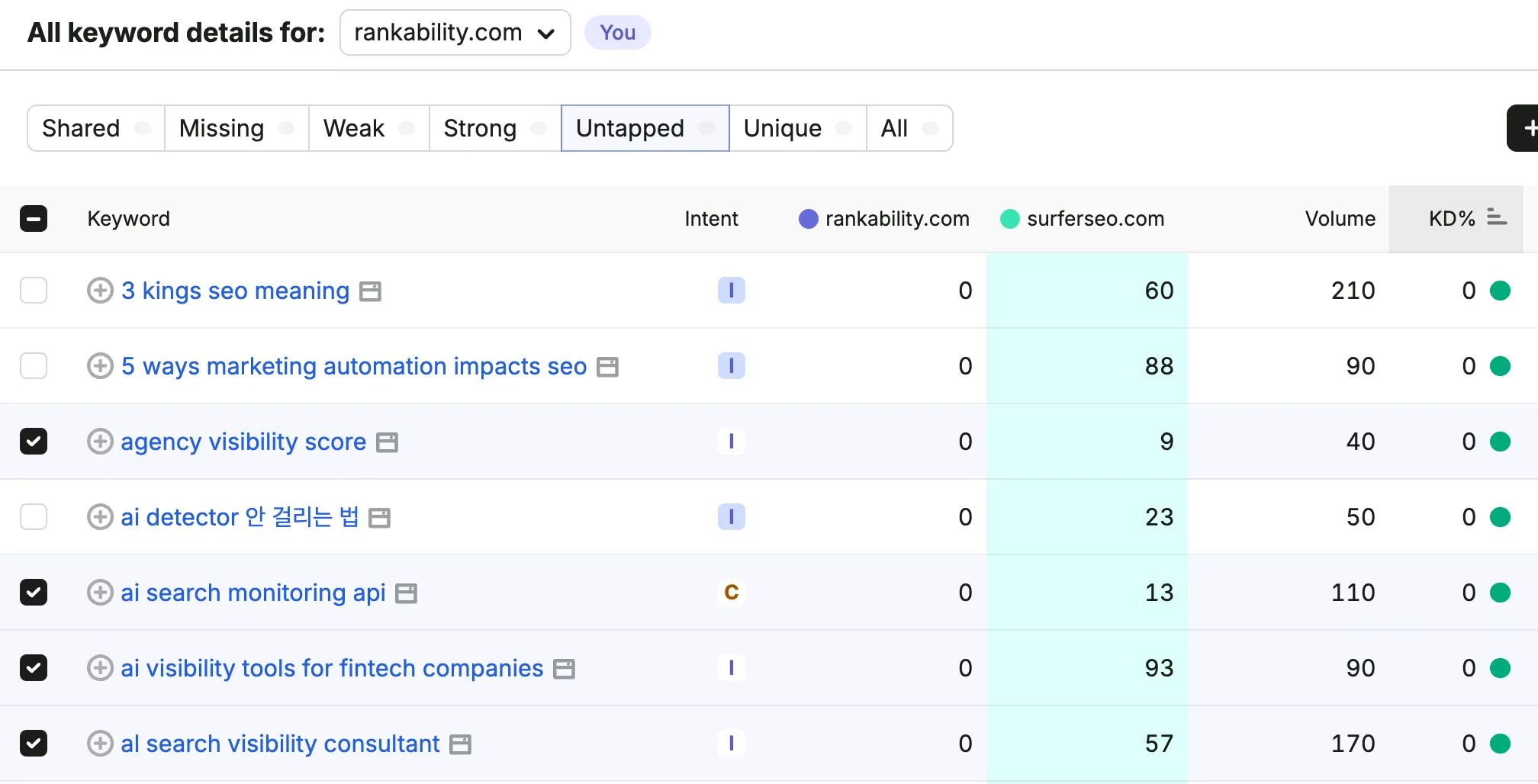
These keywords will be your quickest wins:
Find Your Competitor’s Backlinks
Semrush also has many different backlink analysis tools, but gap analysis is my favorite for competitor research. It functions similarly to the keyword gap tool, except enter your competitors into the Backlink Gap tool.
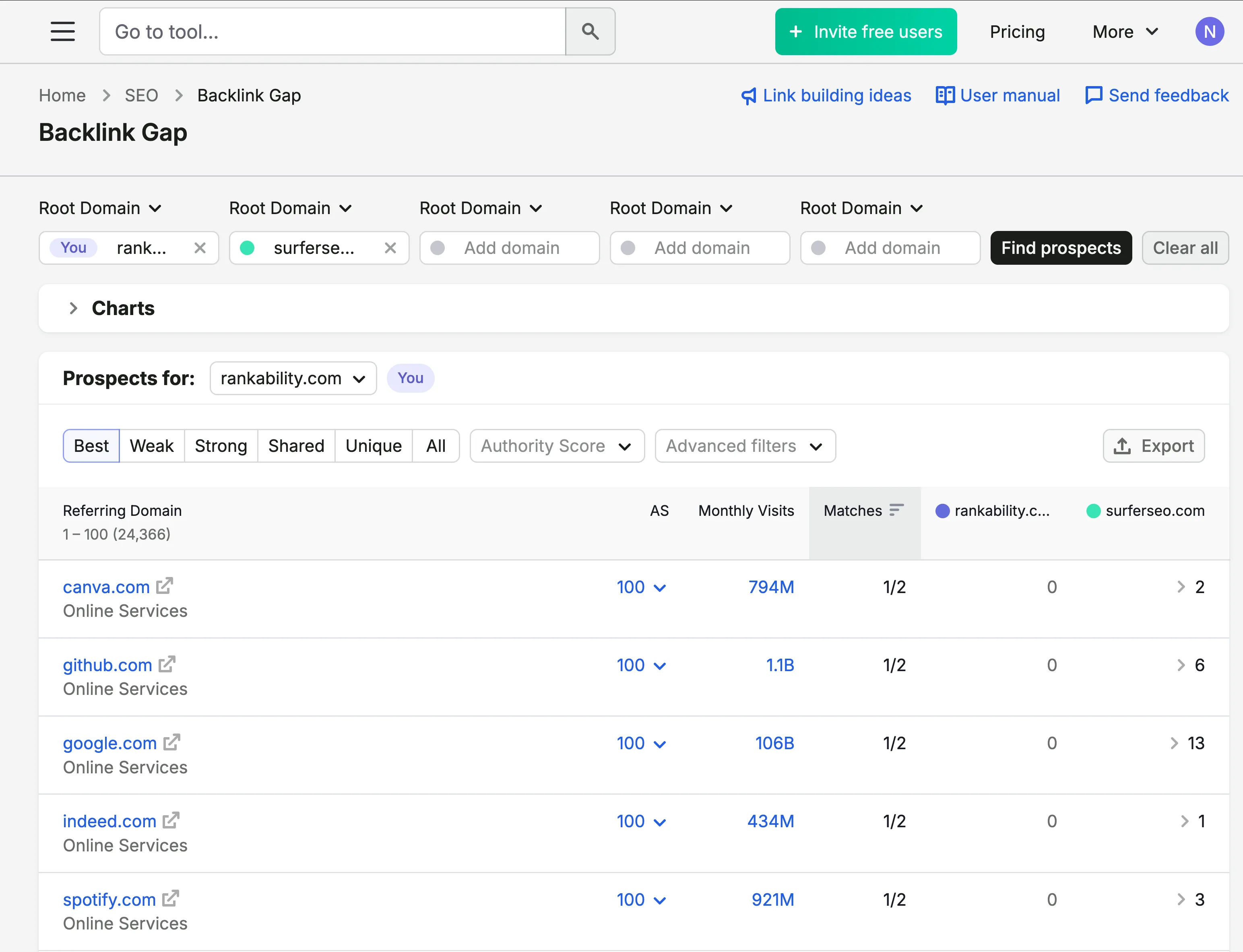
Now, you’ll have access to all their placements and backlink profile. The next step is to study how they acquired these links.
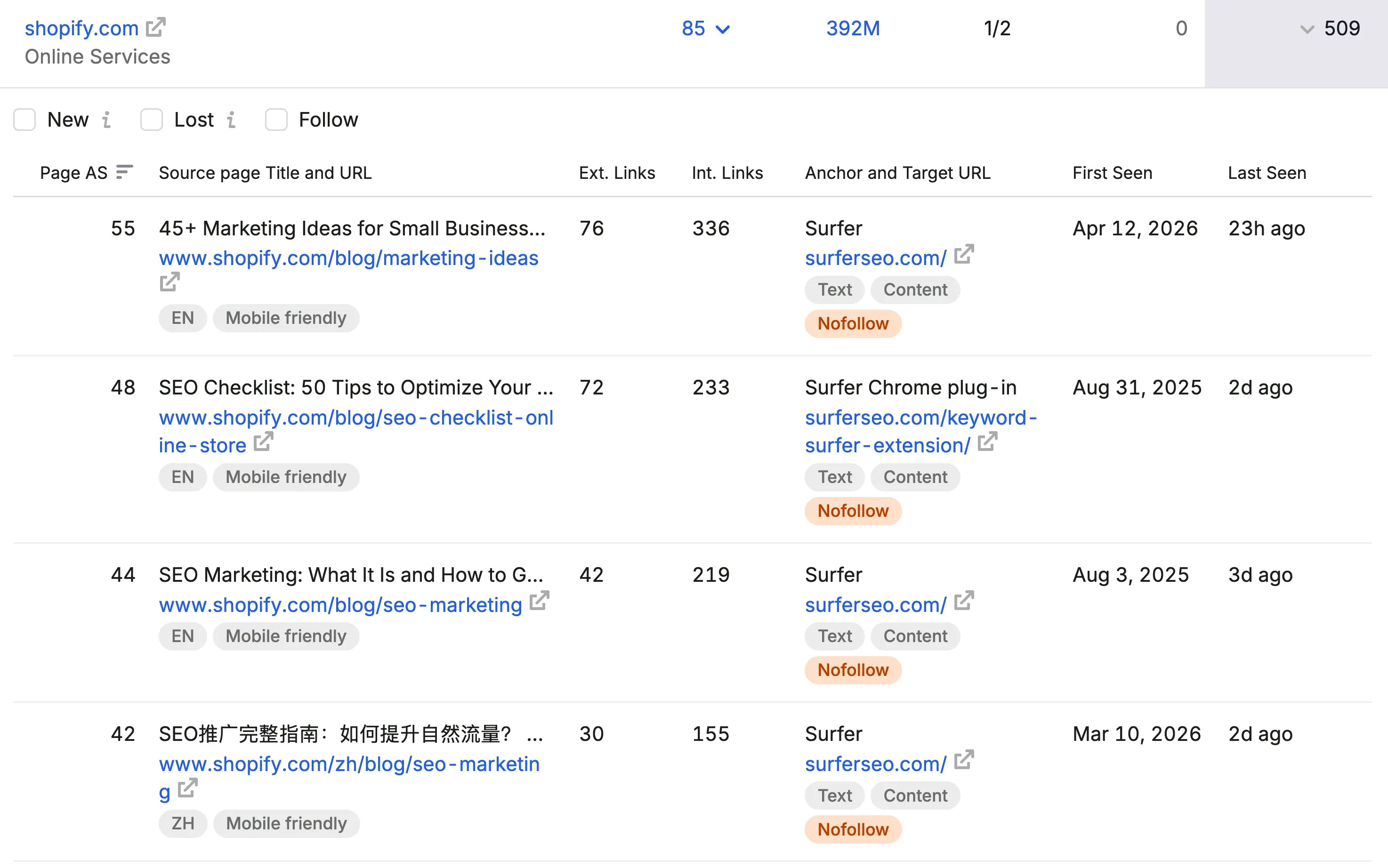
In most cases, the backlink checker allows you to see the types of web pages attracting these backlinks. Then, you use these proven frameworks to create something different, better, or more up-to-date.
Semrush has a learning curve because there’s a lot inside the platform. Be patient and focus on the workflows that directly support your SEO strategy instead of trying to use every feature.
Also remember that Semrush is using third-party data.
That data is incredibly useful for understanding the broader market, but it isn’t going to be as accurate as the first-party data inside Google Search Console when you’re analyzing your own website.
7. Screaming Frog
Screaming Frog is the ultimate website audit tool because it allows you to crawl any website to identify technical and content opportunities.
Here’s how to use it for SEO audits:
Connect the Google Analytics, Google Search Console, Google PageSpeed Insights, and Ahrefs APIs and run the crawl.
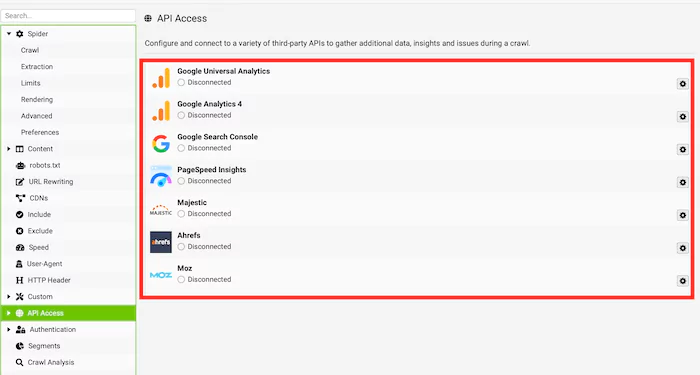
Now, you can find hundreds of SEO opportunities by doing this, but here are four high-impact opportunities to look for:
Crawl Depth
Go to the “Crawl Depth” column and look for pages that are more than three clicks deep into the site architecture.
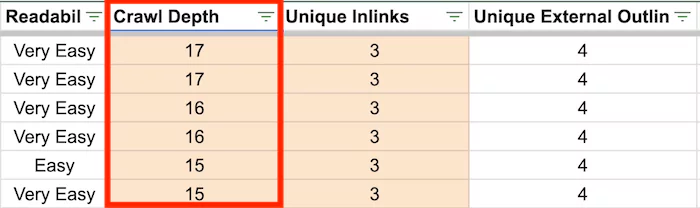
You’ll need to move those pages further into the architecture so Google can crawl and index them more easily.
Internal Link Coverage
Go to the Unique Inlinks section and look for pages that have less than five internal links.
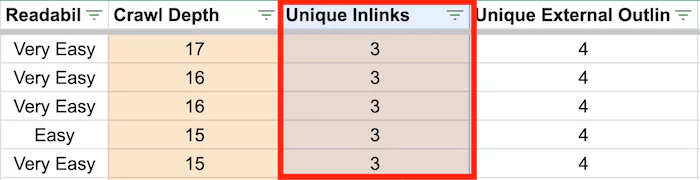
These are pages that you should look to build internal links from other relevant pages on your website.
If no other relevant pages exist, this indicates that you need more topically relevant SEO content.
Poor Engagement Rate
Go to the “Engagement Rate” column, which is data that comes from Google Analytics 4.
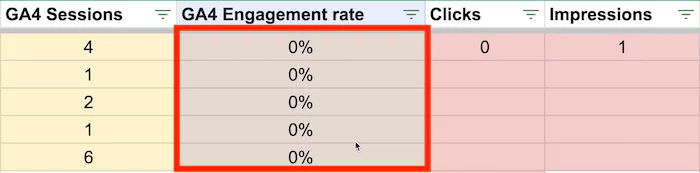
In short, this metric tells you how well users engage with your content.
If it’s low, you know there’s room to improve the page. In general, poor UX will likely lead to poor SEO performance.
Pages with Poor SEO Performance
Pages with zero impressions and clicks from Google Search Console, zero traffic from Google Analytics, and zero backlinks from Ahrefs should be flagged for review.
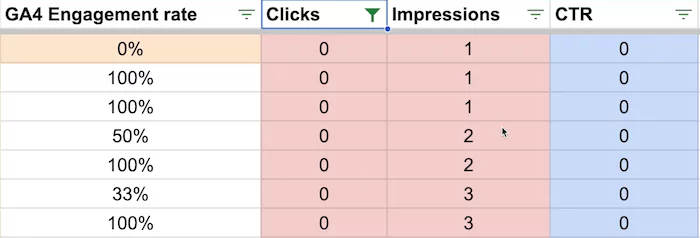
From there, you’ll need to analyze the page and decide what to do with it.
There are only a few realistic options:
- Delete it
- Upgrade it
- Consolidate it with another asset
Delete and 404
This is the best option if the content is thin, outdated, or low-quality.
Upgrade
Maybe the page hasn’t gotten the love it deserves.
So go back to the drawing board, rebuild it, and republish it.
This is a good option when the page targets a keyword but hasn’t performed well.
Consolidate and 301 Redirect
Sometimes, you’ll find keyword cannibalization when two or more pages target the same keyword phrase.
In that situation, you may need to consolidate the competing assets and 301 redirect the weaker URLs so Google has a clearer understanding of which page you want to rank.
Another situation for consolidation is when you’re dealing with many thin assets.
It might make more sense to consolidate these assets into a super asset.
8. PostHog
No one really talks about PostHog as an SEO tool.
The only reason I originally knew about it was because I was building software.
PostHog is incredibly useful for seeing how users are engaging with a software product, but you can also install it on a normal website.
That gives you another beautiful data source for making quantifiable decisions instead of guessing your way through an SEO campaign.
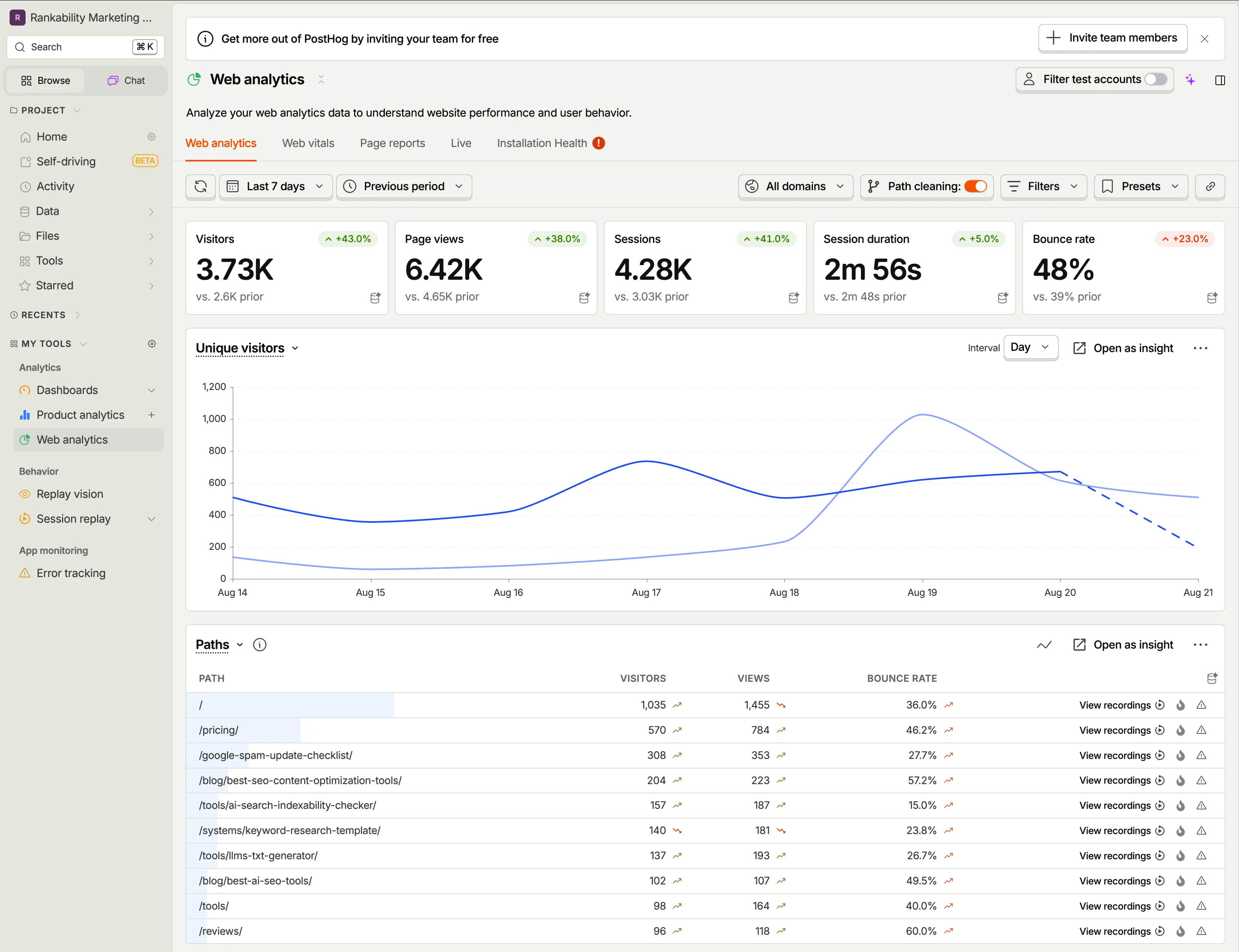
You can use it to:
- Monitor Web Vitals
- Analyze page performance
- Review user behavior
- Watch session recordings
- Measure conversions
- Dig deeper into how users move through your website
PostHog is more advanced.
It isn’t where I’d start if you’re a beginner.
If you’re early in this process, stick with Microsoft Clarity. It’s easier to set up and gives you most of the behavior data you need.
If you’re ready for something more intense and want deeper control over the data, PostHog is worth installing.
9. Claude Design
Another tool I absolutely love and use every day is Claude Design.
I use it to build branded graphics for website content, reports, social media, presentations, and other marketing assets.
I’ve added our brand guidelines, fonts, colors, and visual direction, so anything I create inside Claude Design stays consistent with the Rankability brand.
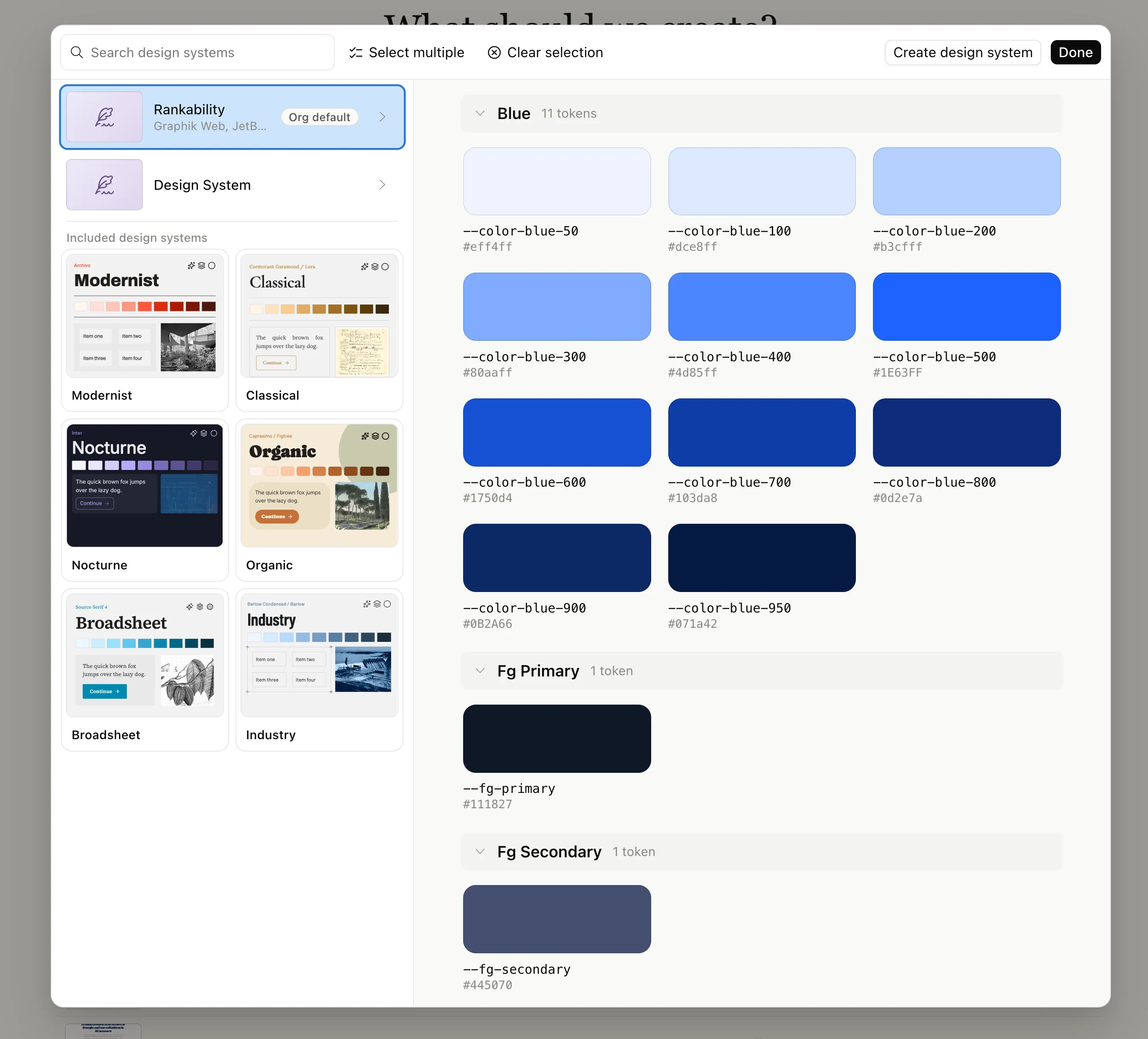
And I probably shouldn’t say I’m building all of it.
Claude is building it.
I’m coming up with the concept, deciding what information needs to be included, and directing the output. But the actual design work has never been easier.
Good Content Needs to Be Designed
A lot of people understand that they need to write good content.
Far fewer people think deeply about how to design that content.
How do you make the information easier to understand?
Where can a graphic replace three paragraphs of explanation?
How can you make the page feel more credible, useful, and memorable?
I’ve used Claude Design to create entire report pages, including the graphics, visual hierarchy, and overall design direction.
From an SEO perspective, this is incredibly useful because it helps you make content much more visually compelling.
Good content shouldn’t just be written well.
It should be designed well.
10. Claude, Codex, or ChatGPT
No modern SEO tool stack is complete without an intelligent model that can do some of the heavy lifting.
Personally, I use Codex more than Claude, but they’re incredibly close. You can basically get the job done with either one.
ChatGPT can also be useful for research, analysis, coding, and working through complex campaign data.
The more important question isn’t which model you choose.
It’s what you connect the model to.
Use MCP to Connect Your Tools
Don’t worry too much about the technical terminology.
An MCP connection simply allows Claude, Codex, or another compatible model to connect to a tool, access the relevant information, and perform work based on that data. Rankability’s MCP setup guide shows how to make that connection.
You’re creating a connection between the intelligence and the tools you already use.
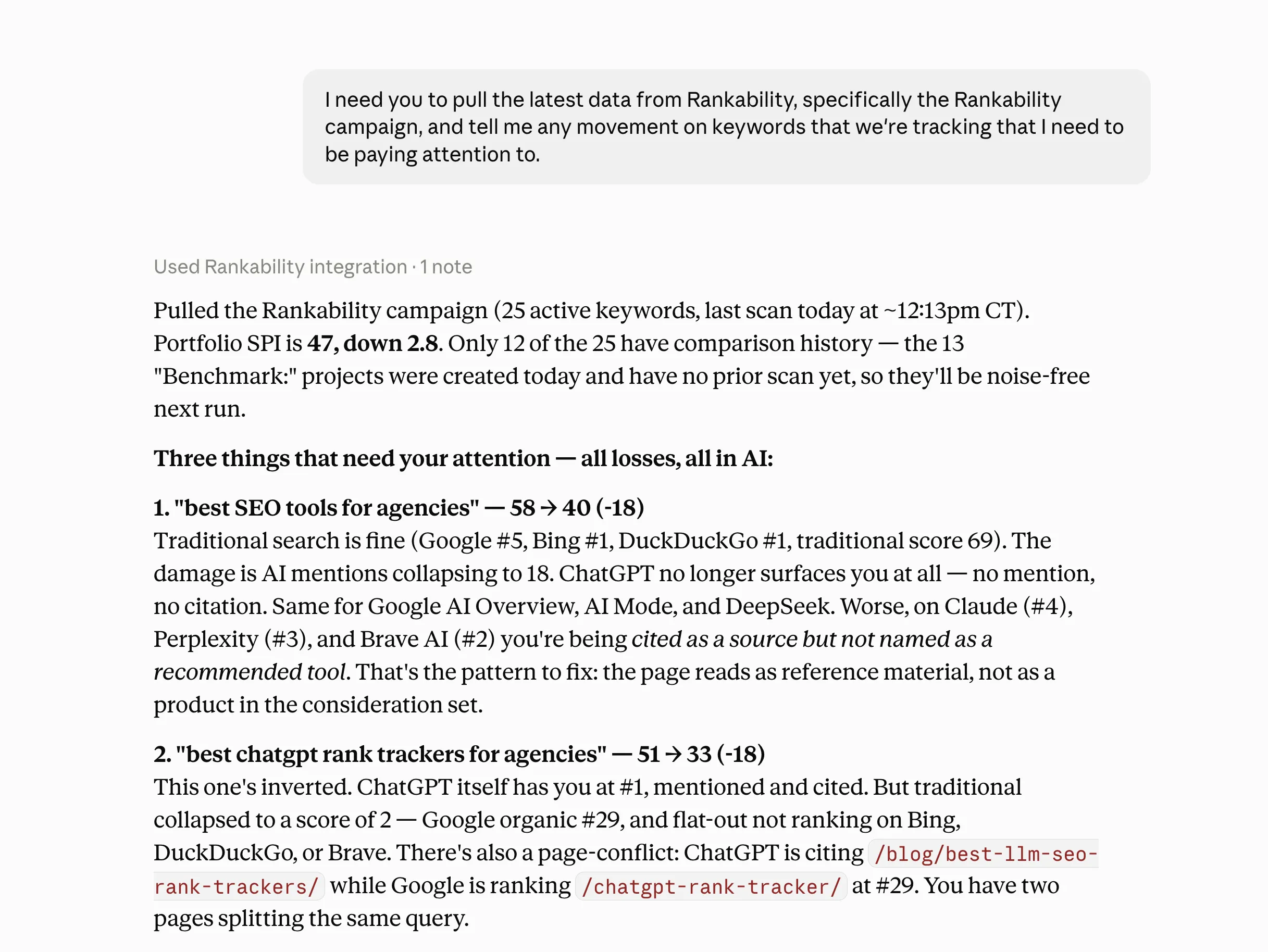
Instead of manually exporting data from one platform, copying it into another platform, analyzing everything yourself, and then deciding what to do next, the model can pull the data and synthesize it directly.
Use Grounded Campaign Data
For example, I connected Claude to Rankability and asked it to pull the latest campaign data and identify keyword movement I needed to pay attention to.
Within a few minutes, it found the decline in the Search Performance Index score for this article.
Then I asked it to use Rankability to run a page audit and report the findings.
That gave me:
- The change in performance
- The surface where the decline was happening
- The page-level weaknesses
- Evidence of cannibalization
- A clear reason to update the article
That’s much more useful than opening a generic chatbot and asking it to give you SEO advice without any knowledge of the campaign.
Grounding Is What Makes the Model Useful
These models become far more useful when you give them grounded information.
Give them access to the actual campaign data, page audits, keyword movement, analytics, and source material.
Give them the material and raw food they need.
That’s when you begin to expose the intelligence at a much higher level.
Additional SEO Tools Worth Considering
Detailed SEO Extension
Detailed isn’t designed to be a comprehensive SEO platform, but it’s perfect for inspecting basic on-page SEO elements at a glance. I covered it in depth in my Detailed SEO extension review.
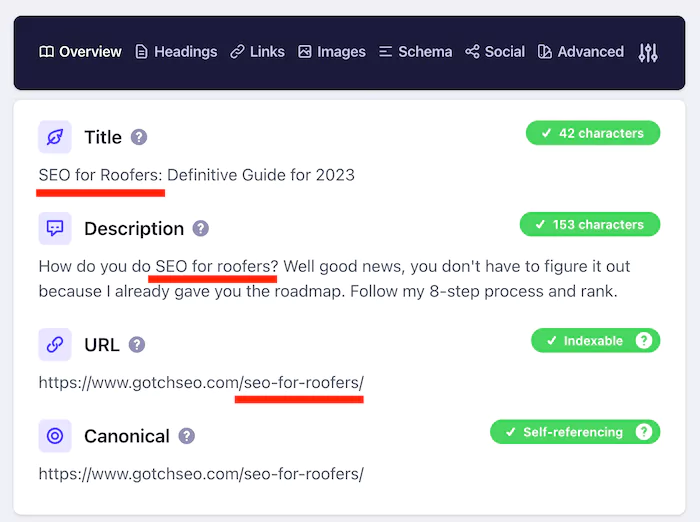
You can quickly review:
- The title tag
- Meta description
- Headings
- Canonical tags
- Structured data
- Internal and external links
- The XML sitemap
- The robots.txt file
It’s a simple browser extension, but it’s still useful when you need to inspect a page quickly.
Bing Webmaster Tools
Bing Webmaster Tools gives you another view of organic search performance.
Google still represents far more search demand, but Bing is worth tracking, especially as Microsoft continues connecting search and AI visibility data across its ecosystem.
It’s also useful alongside Microsoft Clarity because some of Clarity’s AI visibility reporting is connected to Bing data.
SEOTesting.com
The good news is that you don’t need to guess what works in SEO.
You can document a change, establish the test period, and measure whether your actions produced an outcome.
That’s where SEOTesting.com comes into play.
For example, I wanted to improve rankings for the keyword “SEO for roofers.”
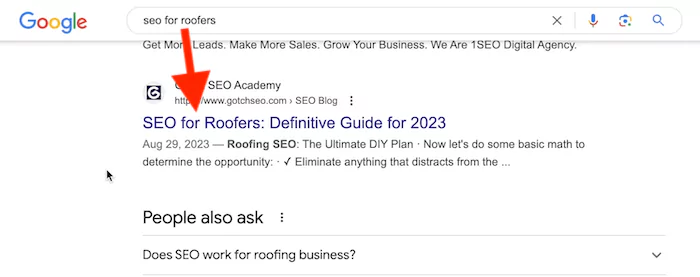
I upgraded the landing page and used SEOTesting.com to measure the impact.
Based on the test data, organic clicks increased by 627.27%.
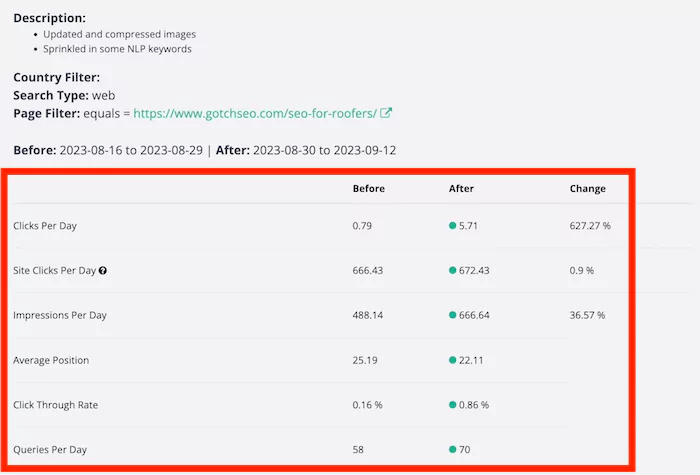
That’s much more useful than making changes and assuming they worked.
Looker Studio (formerly Google Data Studio)
Looker Studio is worth considering if you want to build custom SEO dashboards while keeping your reporting software costs low.
It’s flexible, but you’ll need to invest time in setting up the data sources, designing the reports, and maintaining the dashboards.
That can make sense if your agency wants complete control over reporting.
If you’d rather use something that’s easier to set up and manage, a dedicated agency reporting platform may be a better fit.
AgencyAnalytics
AgencyAnalytics is worth considering when you need an easier way to bring data from Google Analytics, Google Search Console, Semrush, Ahrefs, and other platforms into one client-facing reporting environment.
Once you connect your tools, you can create white-label dashboards and reports without building the entire reporting system from scratch.
It’s a significant investment, but it may be worth it compared with the time and complexity required to build and maintain your own reporting infrastructure. If you want to see how it stacks up against other options, check out my roundup of the best SEO reporting tools.
The Bottom Line
Digital agencies have an abundance of options when it comes to SEO software.
But a tool is only as good as the system and the person using it.
The mistake is collecting subscriptions and expecting the software to create the strategy for you.
Build the system first. Then use the tools to improve your performance.
The difference now is that intelligent models can sit on top of your stack.
When Claude, Codex, or another model can access grounded campaign data through integrations and MCP connections, it can help you pull the data, synthesize it, identify problems, and execute.
My current stack is relatively simple:
- Google Search Console is an absolute must for first-party search data.
- Google Analytics is necessary for tracking conversions and business outcomes.
- Microsoft Clarity or PostHog helps you see how users are actually interacting with your pages.
- Ahrefs and Semrush are still useful for third-party keyword, competitor, and backlink research.
- Screaming Frog remains one of the best tools for technical and content audits.
- Claude Design helps make content more visually compelling.
- Claude, Codex, or ChatGPT provides the intelligence layer.
- Rankability is my daily driver for managing SEO and AI search campaigns across multiple websites and clients.
You don’t need every tool.
You need the right data, a repeatable workflow, and a system that helps you move from information to execution.
And when you use AI, give it the grounding it needs.
Give it the material and raw food it needs to do something useful.